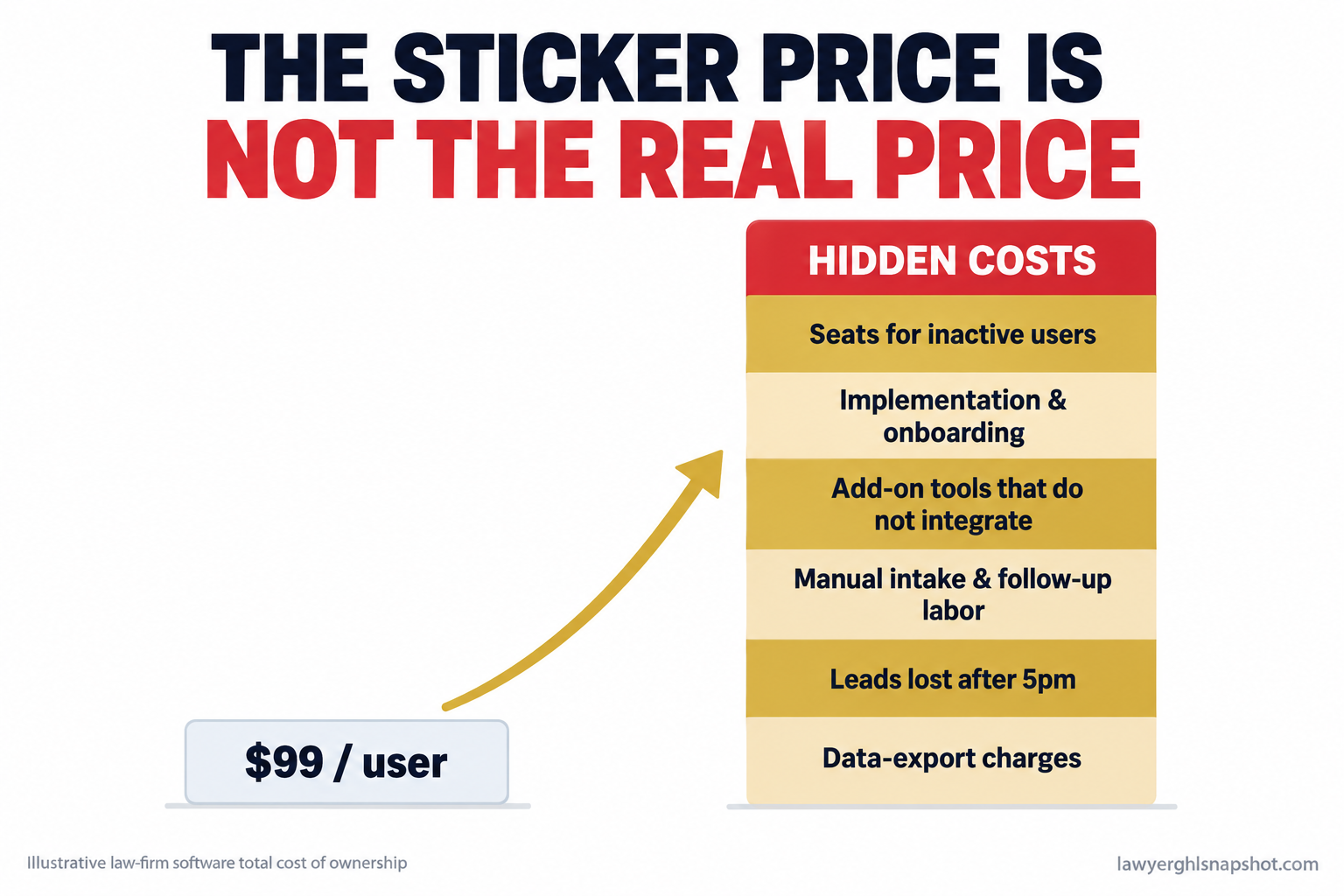
It is the last week of the month and you are staring at the card statement. There is the big practice-management line you expected. Then the e-signature tool, the scheduler, the texting service, the email platform, the call tracker, and two seats for a paralegal who left in March. None of them talk to each other, so you still copy a new client’s details into three of them by hand. And the thing you actually needed, the one that books consultations while you are in court, is the tier they will only quote on a call.
Short answer: your software has a sticker price (the seat fee the rep leads with) and a real price, and for most small firms the real price is roughly double. The real price is that fee, plus the tools you bolt on to fill the gaps, plus the hours you still spend doing work the software was supposed to do, plus the leads that leak out after hours. When the real price beats what the software saves you, you are paying to stay busy.
Key Takeaways
- The seat price is not the real price. Add subscription plus implementation plus add-on tools plus the manual labor the software leaves on your desk plus any export fee. For most small firms the true number is close to twice the per-seat figure.
- The biggest cost is the work it does not do. Software that only runs 9-to-5 case management leaves intake, follow-up, reminders, and reactivation on you, where small firms leak the most money.
- Subscription creep is real and quiet. Firms pay for seats tied to former staff and overlapping tools, in charges spread across cards that are easy to miss (ABA GPSolo, 2026).
- You can run the math in 30 minutes. The audit below gives you a defensible monthly number, and tells you whether your stack is above or below water.
Table of contents
- What does the wrong software actually cost you?
- The 7 signs your software costs more than it saves
- How to run the real math: solo, 5-attorney, 15-attorney
- Steal this: the 30-minute software audit
- The compliance angle most vendors skip
- Common objections
- FAQ
What does the wrong software actually cost you?
Start with the day you already work. In Clio’s benchmarks the average lawyer’s utilization rate is 38%, about 3.0 billable hours in an 8-hour day. After 88% realization and 93% collection, a full day turns into roughly 2.4 hours of collected, billable time (Clio Legal Trends, 2025). The five non-billable hours are not all waste. A big slice is intake, scheduling, and follow-up, the exact work the right system should take off you.
Now price the tools. Law firm technology spending grew 9.7% in 2025, well ahead of inflation (Thomson Reuters / Georgetown, 2026). The question nobody runs is whether that spend buys back more time than it costs. A Censuswide survey for Access Legal in April 2026 found fee earners lose 4.16 billable hours every week to admin workarounds, manual processes, and time-capture tools that do not work well enough (Legal Futures, 2026). Software you fight is software that costs you.
An average 8-hour workday turned into collected billable time at small-firm utilization (38%), realization (88%), and collection (93%). Source: Clio Legal Trends, 2025.
A tool earns its line only when it gives back more hours and more signed clients than it takes, and the biggest leak is usually not inside the case-management product, but in the hours around it.
The 7 signs your software costs more than it saves
None is fatal alone. Two or more together, and your stack is underwater.
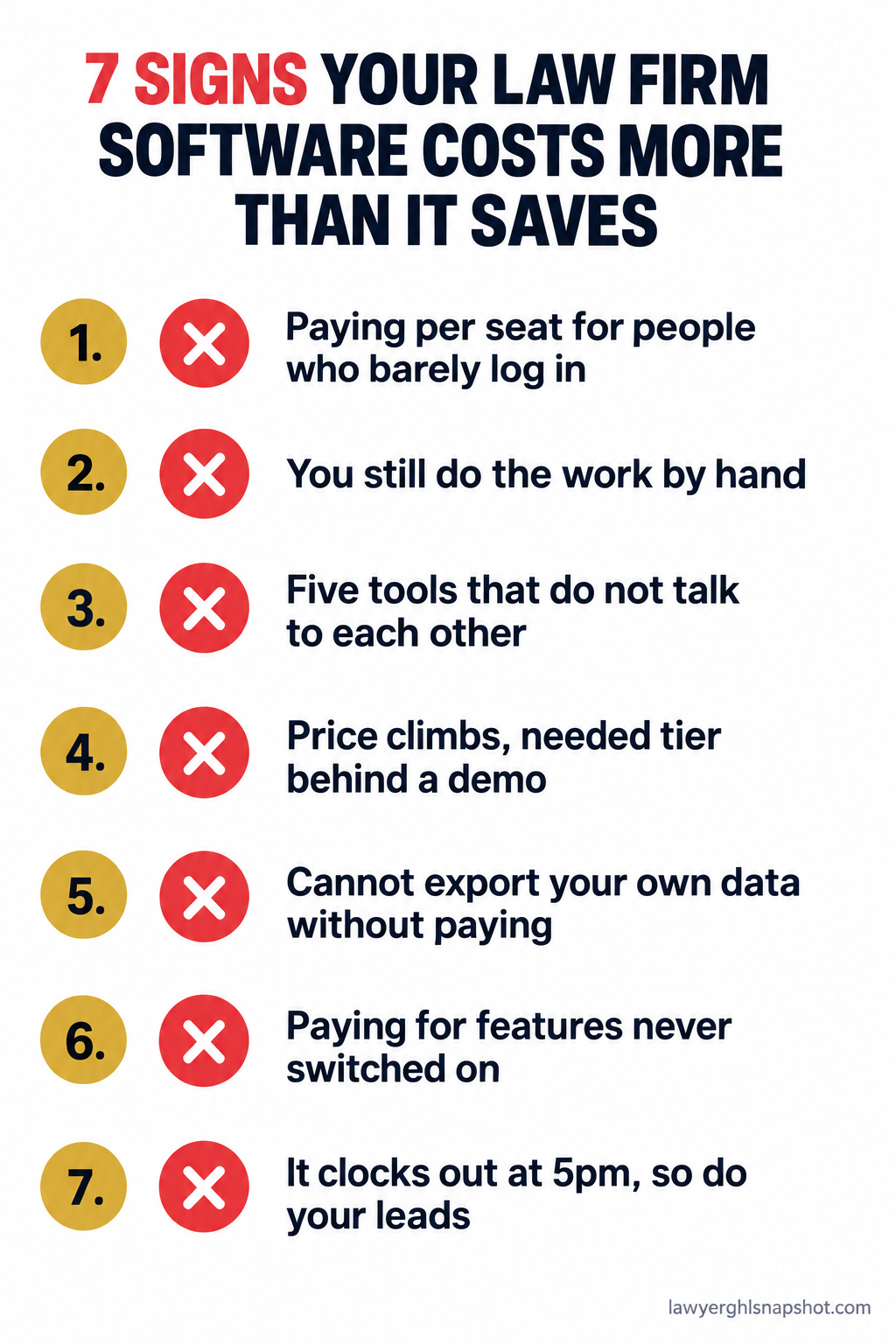
1. You pay per seat for people who barely log in
Per-user pricing punishes you for growing. Clio publishes EasyStart around $49 per user per month and gates higher tiers behind a quote (Clio pricing). MyCase runs roughly $50, $100, and $130 per user across Basic, Pro, and Advanced (MyCase pricing). PracticePanther ladders from about $49 to $114 per user (PracticePanther pricing). Every number multiplies by head count, including the login of the paralegal who left in March. The ABA warns that firms routinely pay for seats tied to former staff and tiers richer than the user needs (ABA GPSolo, 2026).
How it breaks: three dead or over-provisioned seats at $120 is $4,320 a year for nothing, and nobody downgrades.
What to do: match every active seat to a person who logged in this month and the lowest tier they need, kill the rest, and favor tools that do not charge you more every time you hire.
2. You still do by hand the work you bought the software to do
This is the most expensive sign and the easiest to rationalize. You are still typing a new lead into the CRM, then the calendar, then the intake form, still calling back missed numbers one at a time and texting reminders the night before a consult. Software that stores information but does not move it is a filing cabinet with a subscription.
How it breaks: the manual steps feel small, so you never cost them. Fifteen minutes of re-keying across 40 new matters a month is 10 hours, every month, on top of the software fee.
What to do: list every task you still do by hand that the tool was sold to handle. Each is a missing configuration, a missing integration, or a sign the tool was never built to do it, and the last case calls for a layer that actually automates client intake for a small firm.
3. Your “system” is five tools that don’t talk to each other
Ask a struggling firm what software they run and you hear a stack: case management, a scheduler, a texting app, an email platform, an e-sign tool, a call tracker. Together they are a tax with two parts. The stacked subscriptions renew on different dates, so you never see the total. And tools that do not integrate make a human the integration, copying the booking into the CRM and the signed document into the matter. That is the 4-plus hours a week the Access Legal survey measured (Legal Futures, 2026).
How it breaks: a lead fills out the website form, the form does not trigger a text, the lead sits three hours and hires the firm that called back in five minutes.
What to do: map your stack on one page, each tool with its cost and what it hands to the next, then automate or consolidate every handoff that runs through a person.
4. The price keeps climbing and the tier you need is behind a demo
You signed at one price, the renewal came in higher, and the feature you wanted lives in a tier they only quote on a call. Smokeball publishes four plans and no dollar figures, with the automation-heavy Grow and Prosper+ tiers quote-only (Smokeball pricing). Filevine is fully quote-based, with small-firm figures reported around $7,500 a year (Filevine pricing). Lawmatics is quote-driven with a reported three-user minimum (Lawmatics pricing). Hidden pricing is a strategy: it anchors the number to your firm and raises it at renewal once switching feels painful. We broke two down: the Smokeball pricing breakdown and the Filevine teardown.
How it breaks: you budget off the entry price, then the quote for the tier you need lands at two or three times that, once you are already migrated in.
What to do: get every number in writing before you sign, including the renewal rate, and compare against transparent case-management alternatives that publish a full ladder.
5. You can’t get your own data out without paying
Your matters, contacts, and documents are your firm’s property and your ethical responsibility. Some vendors make leaving expensive on purpose, with export fees, proprietary formats, or a migration-out only a paid specialist can run. When the cost of leaving is high enough, you stop shopping.
How it breaks: you discover the switching cost only when you try to switch, when you have the least room to negotiate.
What to do: before you commit, ask in writing, “If we leave, how do we get all of our data out, in what format, and at what cost?” A vague answer means the real price includes a ransom on your own files. Plan the exit the way you would plan a migration onto a new platform.
6. You pay for a long list of features you’ve never switched on
Enterprise platforms sell on the length of the feature list: document assembly, advanced reporting, litigation analytics, a dozen integrations. On the invoice it is value you are renting and not using. The ABA names overlapping and unused functionality as a prime target for an audit (ABA GPSolo, 2026).
How it breaks: you justify the top tier by the features it unlocks, then use three of them, paying enterprise prices for a fraction of an enterprise product.
What to do: count what your firm actually touches in a normal week. If the tier is justified by features still switched off a year in, you are on the wrong one.
7. It clocks out at 5pm and so do your leads
This is the sign that shows up on no invoice and costs the most. Traditional software runs when your office runs. The prospect who calls at 7:40pm, fills out the form on Saturday, or texts “are you taking new DUI cases” at 10pm meets a voicemail. Your case tool was never built to answer, so the lead calls the next firm on the list. The firm that responds first usually wins, and “first” now means minutes. That is why missed-call text-back and 24/7 intake move revenue harder than any case-management feature.
How it breaks: you measure your software by how well it runs open matters, never against the matters that never opened.
What to do: count your after-hours inquiries for two weeks, and how many got a reply within five minutes. If the answer is “almost none,” your biggest gap is a front door that answers around the clock.
How to run the real math: solo, 5-attorney, 15-attorney
The honest number is total cost of ownership, not the seat price:
TCO = seat fees + add-on tools + implementation (over 24 months) + the labor of the manual work it leaves + leads lost after hours.
Here is the same firm at three sizes, in illustrative figures at common published rates, not a quote. Run yours with the worksheet below.
| Firm size | Seat fees (case mgmt) | Bolt-on tools | Manual labor | After-hours leads lost | Realistic annual TCO |
|---|---|---|---|---|---|
| Solo | ~$49-$130/mo, 1 seat | ~$150/mo | ~5 hrs/mo | A few matters a year | ~$9,000-$14,000 |
| 5-attorney | ~$100/user, 5 seats + 2 staff | ~$500/mo | ~25 hrs/mo | Several matters a quarter | ~$45,000-$70,000 |
| 15-attorney | ~$120/user, 15 seats + staff | ~$1,500/mo | ~80 hrs/mo | Steady weekly leakage | ~$180,000-$260,000 |
The seat fee is the smallest column for a reason. For a solo, the add-ons and manual hours already dwarf the subscription. For a 15-attorney firm, after-hours leakage alone can cost more than the entire software budget. The time-tracking slice alone, in the true cost of manual time tracking, shows the same pattern.
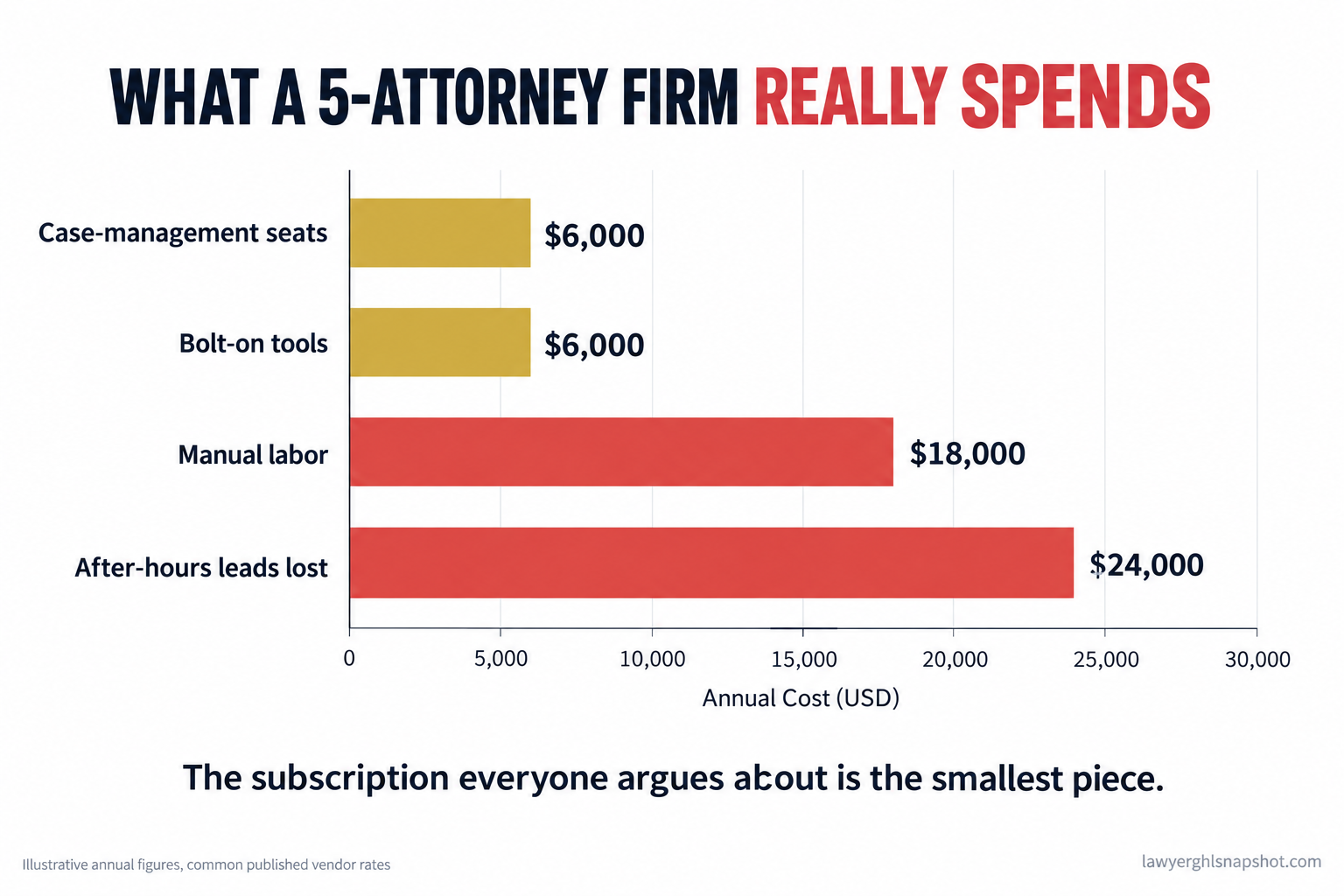
Illustrative annual cost breakdown for a 5-attorney firm. The subscription most firms argue about is the smallest piece. Source: common published vendor rates and typical loaded labor costs.
Steal this: the 30-minute software audit
Block 30 minutes and three months of card statements. The goal is one number: your real monthly software cost, and whether it beats what the tools save you.
And one email forces the hidden numbers into the open before you sign or renew.
The bigger win is Step 3: the manual hours are almost always larger than the whole subscription line, and they are the part you can automate away.
The compliance angle most vendors skip
Software that leaves core work manual is not just inefficient. In a law firm it is a risk surface, in two places.
First, trust accounting. When your IOLTA reminders and three-way reconciliation run on a human’s memory instead of an automated workflow, a missed reconciliation is not an accounting slip, it is a discipline exposure under your state’s trust-account rules.
Second, intake and texting. If your only reliable client communication is manual, your TCPA and A2P 10DLC posture depends on whoever happens to send the message. A proper system enforces consent, quiet-hours, and opt-out the same way every time, and any AI that answers must disclose it is not an attorney and route or schedule only, never opine on “what are my chances,” which strays into unauthorized practice of law. We are an automation product, not a law firm, so confirm specifics with your own bar. But manual compliance is expensive compliance: the downside of getting it wrong is a bar complaint, not a refund.
Common objections
“Switching software is a nightmare. Isn’t it cheaper to stay?” Sometimes, and that is what vendors with hidden export fees count on. But the audit gives you a real number: if your stack is underwater by tens of thousands a year, a one-time migration pays for itself fast. You also do not have to rip out your case manager, since the biggest leaks can be fixed with a layer alongside it.
“We already pay for Clio or MyCase. Why add anything?” Because those tools manage the clients you already signed. They were not built to answer the phone at 8pm, text back a missed call in 60 seconds, or reactivate old matters, and those jobs are the ones that bring in new revenue. Keeping your case manager and adding a front door is normal, not redundant.
“Cheaper software just means worse software, right?” Not when the pricing model is different. One per-seat case manager charges you more every time you hire. A flat-fee automation layer handles intake, follow-up, reminders, and reactivation for one price, whatever your head count. Lower cost per signed client is not lower quality.
The bottom line
Run the number: 30 minutes, three months of statements, the four steps above. The subscription everyone argues about is the cheap part. The expensive part is the work the software never did, and that is worth fixing first. You bought software to buy back time and sign more clients. If it is doing neither, it is not a tool, it is a tax, and you get to stop paying it.
Frequently asked questions
How do I know if my law firm software is worth the cost?
Run a 30-minute audit. Total every software charge from three months of statements, add the dollar value of the manual work the tools still leave you doing at a loaded hourly rate, and add a value for leads lost after hours. If that number beats the hours and signed clients the software gives back, your stack costs more than it saves.
What is the real total cost of ownership of legal software?
TCO is seat fees plus bolt-on tools plus implementation over the contract plus the labor of the manual work the software leaves on your desk plus the value of leads that leak after hours. For most small firms it is close to double the per-seat price, because the seat fee is the smallest column.
Why do some legal software vendors hide their prices?
Quote-only pricing lets a vendor anchor the number to your firm, bundle everything into one figure you cannot compare, and raise it at renewal once switching feels painful. Smokeball's upper tiers, Filevine, and Lawmatics are commonly quote-gated. Get the tier price, renewal rate, and export terms in writing first.
Should I replace my case management software or add to it?
Usually add, not replace. Case managers like Clio or MyCase run the matters you already signed, but were not built to answer after-hours calls, text back missed numbers in minutes, or reactivate old leads. Those revenue jobs are best handled by an automation layer alongside your case manager.
How much do small law firms waste on unused software seats?
Subscription creep is common and quiet. The ABA warns that firms routinely pay for seats tied to former staff and tiers richer than the user needs. Three dead or over-provisioned seats at around $120 each is over $4,000 a year for nothing, and a quick review almost always finds one or two to cancel.