How do you migrate a law firm to GoHighLevel?
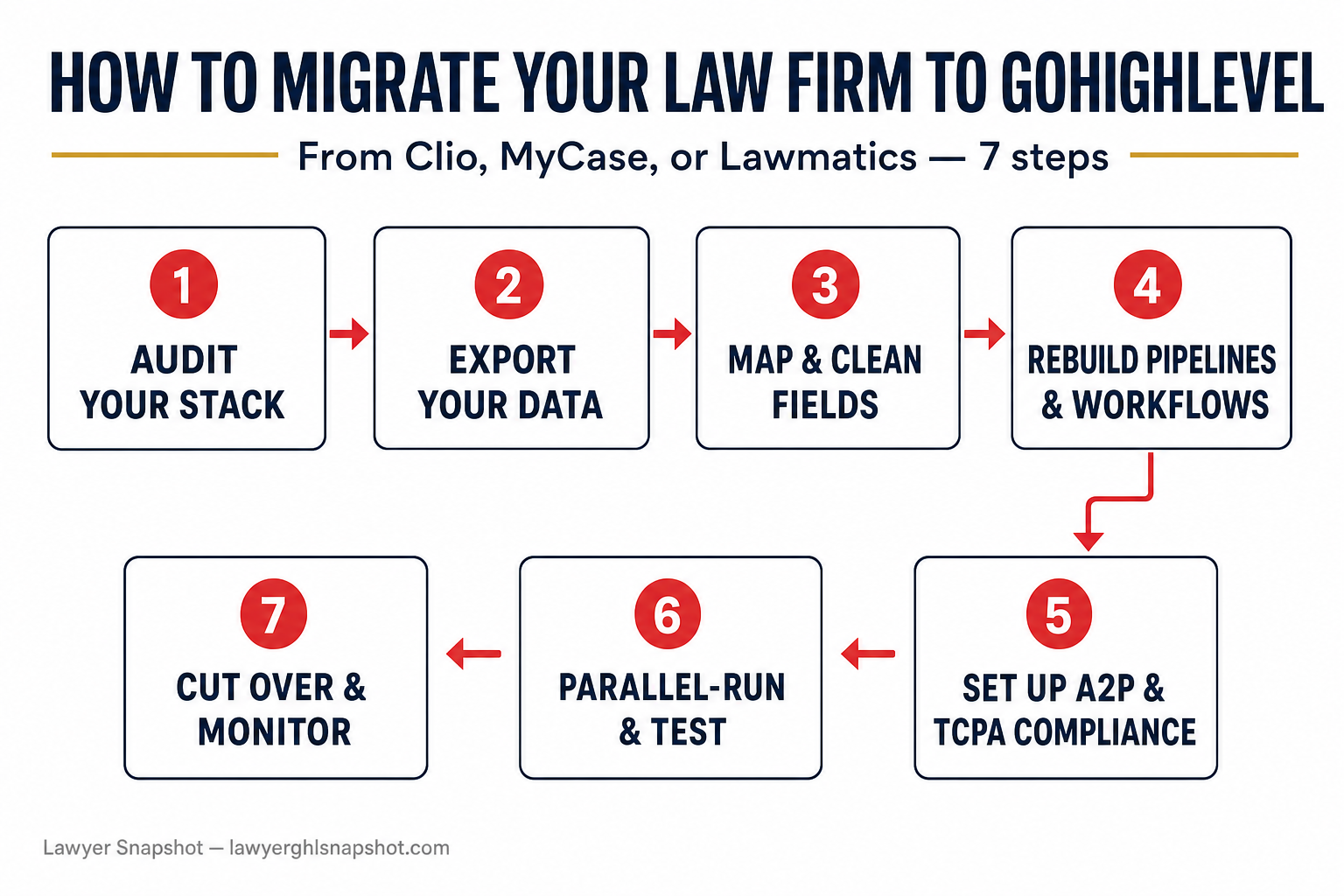
To migrate a law firm to GoHighLevel from Clio, MyCase, or Lawmatics, you export your contacts and pipeline data as CSVs, map every field to a GoHighLevel equivalent, rebuild your intake forms and follow-up workflows (or install a pre-built legal snapshot), register for A2P 10DLC before you send a single text, then parallel-run both systems on live leads before cutting over and porting your phone number. Done in that order, no contact, matter, or lead history is lost — and your new leads never fall through the cracks during the switch.
The reason firms make the move is rarely GoHighLevel itself — it’s consolidation. Clio, MyCase, and Lawmatics are strong practice-management tools, but most firms bolt a separate CRM, an email tool, a texting app, a booking calendar, a reviews service, and a chatbot on top of them. GoHighLevel folds intake, two-way SMS, email, calendars, pipelines, reviews, and an AI receptionist into one place — which is why so many firms and the agencies serving them are migrating in 2026. This guide is the exact sequence we use to move a firm safely, whether you’re a solo operator switching your own practice or an agency migrating a client.
Key Takeaways
- Migrate in a fixed order or you’ll lose data. Audit → export → map → rebuild → comply → parallel-run → cut over. Skipping the mapping and parallel-run steps is where contacts and live leads disappear.
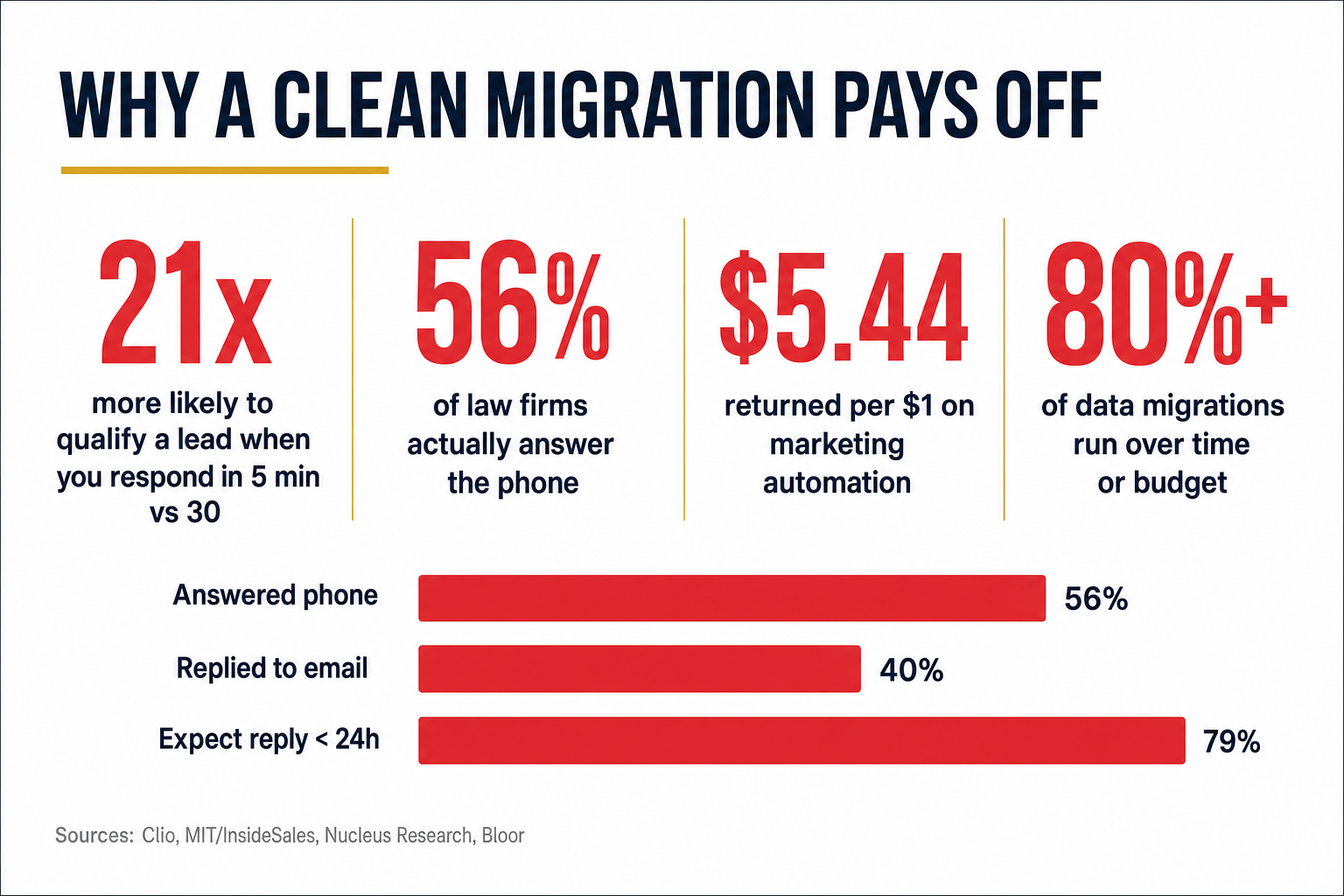
- The risk is real but manageable. More than 80% of data-migration projects run over time or budget, with cost overruns averaging around 30% (Bloor Research, 2011/2017). A written field map and a parallel-run window are what keep a law firm migration from becoming one of them.
- Compliance comes before your first text. Register the sending number for A2P 10DLC and keep TCPA consent intact through the export, or your reactivated database gets you filtered — or worse.
- The payoff is speed and consolidation. Firms that respond within 5 minutes are 21× more likely to qualify a lead than those who wait 30 (MIT/InsideSales Lead Response Management study), and marketing automation returns $5.44 for every $1 spent (Nucleus Research, 2014).
- Don’t do it live and alone. Install a pre-built legal snapshot or have GHL development handle the move so your intake never goes dark mid-switch.
Table of contents
- Why law firms are moving to GoHighLevel
- What actually needs to move (the data inventory)
- The 7-step migration playbook
- The compliance step you cannot skip
- The migration mistakes that cause data loss
- DIY vs. done-for-you: cost and timeline
- Frequently asked questions
Why law firms are moving to GoHighLevel
Cloud software is already how small firms run. 79% of solo firms and 81% of small firms now use cloud-based practice-management software (Clio 2025 Legal Trends for Solo & Small Law Firms). The problem isn’t adoption — it’s sprawl. A typical firm’s stack looks like Clio (or MyCase, or Lawmatics) for matters, plus Mailchimp for email, plus a texting add-on, plus Calendly, plus a reviews tool, plus a website chat widget. None of them talk to each other, so a lead can come in on the website and never reach the follow-up sequence, because the two systems were never wired together.
That gap has a cost, and it’s measured in signed cases. In Clio’s audit of law firms, only 56% actually answered the phone, and 60% never responded to an email inquiry at all (Clio Legal Trends Report). Meanwhile 42% of legal consumers hire the first attorney they speak with — so the firm that answers first usually wins. When your tools are disconnected, “answering first” is nearly impossible, because no single system is watching every channel.
The responsiveness gap that consolidation is meant to close: how firms actually respond to new inquiries vs. what prospective clients expect. Source: Clio Legal Trends Report.
GoHighLevel closes the gap by putting the whole intake path — web chat, missed-call text-back, two-way SMS, email, booking calendar, pipeline, and an AI receptionist — in one account, on one contact record. That consolidation is where the ROI lives: marketing automation returns $5.44 for every $1 spent, with payback in under six months (Nucleus Research, 2014). But you only capture that return if the migration is done cleanly. Do it sloppily and you inherit a slower, messier version of what you left.
What actually needs to move (the data inventory)
Before you export anything, inventory what you have. A law firm CRM migration is really six migrations happening at once, and each piece has a natural home in GoHighLevel. Here’s the mapping we use as a checklist.
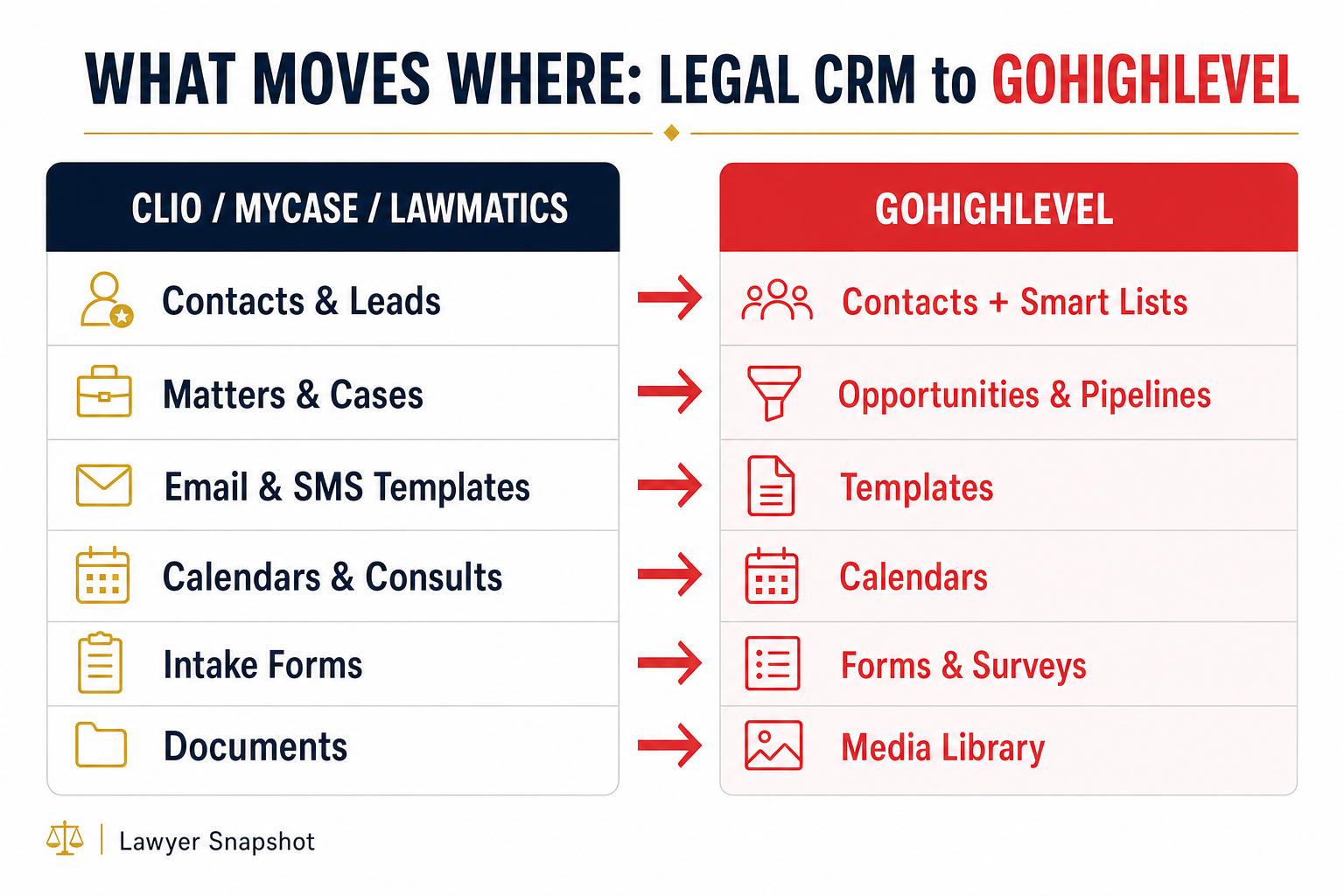
| What you have (Clio / MyCase / Lawmatics) | Where it lives in GoHighLevel | Watch out for |
|---|---|---|
| Contacts & leads | Contacts + Smart Lists | Duplicate records; custom fields |
| Matters / cases | Opportunities in a Pipeline | One pipeline per practice area |
| Email & SMS templates | Templates (Email + SMS) | Merge-field syntax differs |
| Calendars & booked consults | Calendars | Re-share booking links |
| Intake forms & questionnaires | Forms & Surveys | Required-field logic |
| Documents & case files | Media Library (or keep in DMS) | Don’t move privileged files casually |
| Reviews & testimonials | Reputation / Reviews | Re-connect Google/Facebook |
| Phone number | Ported into GoHighLevel | Port last, after A2P approval |
Doing this inventory first is what separates a clean migration from a scramble. It tells you exactly how many custom fields you need to create in GoHighLevel before the import, so nothing lands in a “notes” blob that no workflow can read.
The 7-step migration playbook
This is the sequence. Follow it in order — the order is what protects your data and keeps new leads flowing while you switch.
Step 1 — Audit your current stack and freeze scope
List every tool touching a lead: practice-management CRM, email platform, texting app, calendar, chatbot, reviews tool, and any spreadsheets. For each, note what data lives there and what you’ll replace vs. keep. Write down which pipelines and practice areas you run (PI intake looks nothing like an estate-planning pipeline). Freeze the scope in writing so “while we’re at it” requests don’t turn a two-week move into a two-month one.
Step 2 — Export your data as clean CSVs
From Clio, export contacts and matters via Settings → your account data export (Clio provides a full data export). From MyCase and Lawmatics, use their contact/lead export or request a data file from support. Pull each object into its own CSV: contacts, leads/matters, templates, and any activity history you need. Open each file and confirm the columns are intact and the character encoding is UTF-8 (accented names and Ñ break otherwise). This is your backup, too — never delete the source system until the new one is proven.
Step 3 — Map and clean every field
This is the step people skip, and it’s the one that loses data. In a spreadsheet, put your source columns on the left and the GoHighLevel destination field on the right. Create every custom field in GoHighLevel before importing so nothing has nowhere to go. Clean while you’re here: de-duplicate contacts, standardize phone numbers to E.164 (+1XXXXXXXXXX), split “Full Name” into first/last, and tag records by source and practice area. A mapped, cleaned import is the difference between a searchable database and a junk drawer.
Step 4 — Rebuild pipelines, forms, and workflows (or install a snapshot)
Recreate your intake pipeline stages (New Lead → Contacted → Consult Booked → Retained → Closed), rebuild intake forms, and rebuild the follow-up automations that used to live across three tools. This is the heaviest step if you build from scratch. The shortcut is a snapshot — a pre-built package of legal pipelines, forms, 50+ workflows, and templates you install in one click, then customize. It’s the difference between a multi-week build and an afternoon of configuration.
Step 5 — Set up compliance before you send anything
Register your sending number for A2P 10DLC and confirm your TCPA consent language carried over with your contacts (more on this below). This has a lead time of days, so start it early — do it in parallel with Steps 3–4, not after.
Step 6 — Parallel-run and test with real leads
Do not flip everything off on day one. Run GoHighLevel alongside your old system for one to two weeks. Route a slice of live leads through the new pipeline, book test consults, trigger every reminder and follow-up, and verify texts and emails actually deliver. This parallel window is your safety net — it’s where you catch the broken merge field or the workflow that never fires, while the old system is still catching everything.
Step 7 — Cut over, port your number, and monitor
Once the parallel run is clean, port your main phone number into GoHighLevel (do this last, after A2P approval — porting can take a few business days). Switch your website forms and booking links to the new endpoints, redirect the old ones, and watch the dashboard closely for the first week. Keep the old system in read-only mode for a billing cycle as an archive before you cancel it.
Why the parallel-run step matters: responding to a new lead within 5 minutes instead of 30 makes you up to 100× more likely to connect and 21× more likely to qualify it. A migration that drops leads for even a day erases that edge. Source: MIT/InsideSales Lead Response Management study.
The compliance step you cannot skip
Speed and automation only help if your messages actually get delivered — and for a law firm texting prospects, that means A2P 10DLC registration and TCPA-compliant consent, handled before go-live. This isn’t optional polish; it’s the thing that keeps your reactivation campaign from being blocked by carriers or, far worse, generating a complaint.
Two rules to protect during the migration:
- Preserve consent through the export. When you export contacts, keep whatever opt-in status and source you have. A contact who consented to texts in Clio is still consented in GoHighLevel — but only if that field comes across and you can prove it. Don’t blast a freshly imported list you can’t document consent for.
- Register the number before the first send. A2P 10DLC brand and campaign registration takes lead time and is a hard prerequisite for reliable SMS delivery in the U.S. Start it in Step 5, in parallel with your build, so it’s approved by the time you’re ready to cut over in Step 7.
If compliance is the part that makes you nervous, that’s the strongest argument for not doing the migration solo. Getting A2P registration, consent, and reminder cadences right is exactly the kind of install-tested detail a done-for-you setup handles by default.
The migration mistakes that cause data loss
More than 80% of data migrations run over time or budget (Bloor Research, 2011/2017). Law firm migrations fail for a short list of avoidable reasons:
- No field map. Importing a CSV straight into GoHighLevel without creating custom fields first dumps critical data into a notes field where no workflow can act on it. Map first (Step 3).
- Cutting over live with no parallel run. Flipping the switch on a Monday and hoping is how firms lose a week of leads. Parallel-run (Step 6).
- Porting the phone number too early. Port before A2P is approved and you can end up with a number that can’t reliably send texts. Port last (Step 7).
- Deleting the old system too soon. Keep the source read-only for a full billing cycle as your archive and rollback.
- Ignoring consent. Importing a list and blasting it without documented opt-in and A2P registration is both a deliverability problem and a compliance problem.
Every one of these is prevented by following the seven steps in order. None of them is prevented by moving faster.
DIY vs. done-for-you: cost and timeline
You have three realistic paths. Here’s the honest tradeoff.
Do it yourself. Cheapest in dollars, most expensive in risk and time. If you’re technical, have a small, clean database, and can afford a slow window, a careful DIY migration is doable in a few weekends. The danger is that intake goes dark while you’re heads-down rebuilding workflows.
Install a snapshot, then customize. The middle path. A pre-built legal snapshot gives you the pipelines, forms, and workflows on day one, so your build (Step 4) collapses from weeks to an afternoon. You still do your own export, mapping, and cutover — but on top of a proven foundation instead of a blank account.
Done-for-you migration. We handle the export, field mapping, rebuild, A2P registration, and parallel-run cutover so your intake never drops a lead. Fixed-price GHL development migrations start around $3K for a straightforward sync or migration, with a 30-day bug-fix warranty included. For firms that want a person running the system afterward, a dedicated GHL VA starts at $700/month.
Whichever path you choose, the sequence is the same — the only question is who executes it and how much of the risk you want to carry.
For the bigger picture on running your firm inside GoHighLevel once you’ve moved, see our complete GoHighLevel guide for law firms, and if you’re still deciding, weigh the GHL vs. Clio, GHL vs. MyCase, and GHL vs. Lawmatics comparisons first.
Frequently asked questions
Can I migrate from Clio to GoHighLevel without losing my data?
Yes — if you follow the order. Export your Clio contacts and matters as CSVs, create matching custom fields in GoHighLevel, map every column before importing, then parallel-run both systems on live leads for one to two weeks before cutting over. The data loss firms experience almost always comes from importing without a field map or cutting over with no parallel-run window. Keep Clio in read-only mode for a billing cycle after the switch as your backup and rollback.
Does GoHighLevel replace Clio, MyCase, or Lawmatics entirely?
For front-office work — intake, lead follow-up, two-way SMS and email, scheduling, reviews, and pipeline management — GoHighLevel replaces the marketing and CRM layer of those tools and usually several separate apps on top. It is not a trust-accounting or document-management system, so IOLTA ledgers and privileged case files should stay in your practice-management or accounting software. Many firms run GoHighLevel as the front office and keep a lean practice-management tool for the back office.
How long does a law firm migration to GoHighLevel take?
A DIY migration of a small, clean database can be done over a couple of weekends. Installing a pre-built legal snapshot collapses the build step from weeks to an afternoon, so a snapshot-based move is often live in one to two weeks including the parallel-run window. A done-for-you migration typically runs one to three weeks depending on data volume, number of pipelines, and how much cleanup the old data needs.
What about A2P 10DLC and TCPA compliance when I move?
Register your sending number for A2P 10DLC before you send any texts from GoHighLevel — it has a lead time of days and is required for reliable U.S. SMS delivery. Preserve your TCPA opt-in status and source when you export contacts so you can prove consent, and warm up any database-reactivation campaign in batches rather than one blast. Start A2P registration in parallel with your build so it's approved by cutover, and port your phone number last.
How much does it cost to migrate a law firm to GoHighLevel?
DIY costs only your time plus GoHighLevel's subscription. A done-for-you migration through our GHL development service starts around $3,000 for a straightforward export, field mapping, rebuild, and cutover, with a 30-day bug-fix warranty included; more complex builds with custom AI intake or portals run higher. If you'd rather someone run the system after the move, a dedicated GHL VA starts at $700 per month.
Can an agency migrate multiple law firm clients onto GoHighLevel?
Yes — this is one of GoHighLevel's biggest advantages for agencies. You build the migration and snapshot once, then deploy it across client sub-accounts, optionally white-labeled under your own brand. The same seven-step sequence applies per client; a reusable legal snapshot is what makes repeat migrations fast and profitable.
Marcus Trujillo is a Legal Intake & Automation Strategist at Lawyer Snapshot who spent nine years running intake and case-management operations for a multi-location personal injury firm before moving into legal-tech consulting. He writes about the unglamorous mechanics of intake and migration that quietly decide whether a firm grows or stalls. Lawyer Snapshot is a GoHighLevel automation product for U.S. law firms — not a law firm, and not a provider of legal advice.