It is a Thursday night at the kitchen table with a legal pad, trying to budget next year. You have a PracticePanther tab open, and for once the vendor tells you the price. Solo, forty-nine dollars. That feels fair, so you pencil in forty-nine times your head count and move on. Three months later your bookkeeper asks why the invoice is almost triple what you budgeted. Not a scam. It is the tier ladder working the way it was built to work, and the one feature that keeps your bar license clean was sitting two rungs above the price you wrote down.
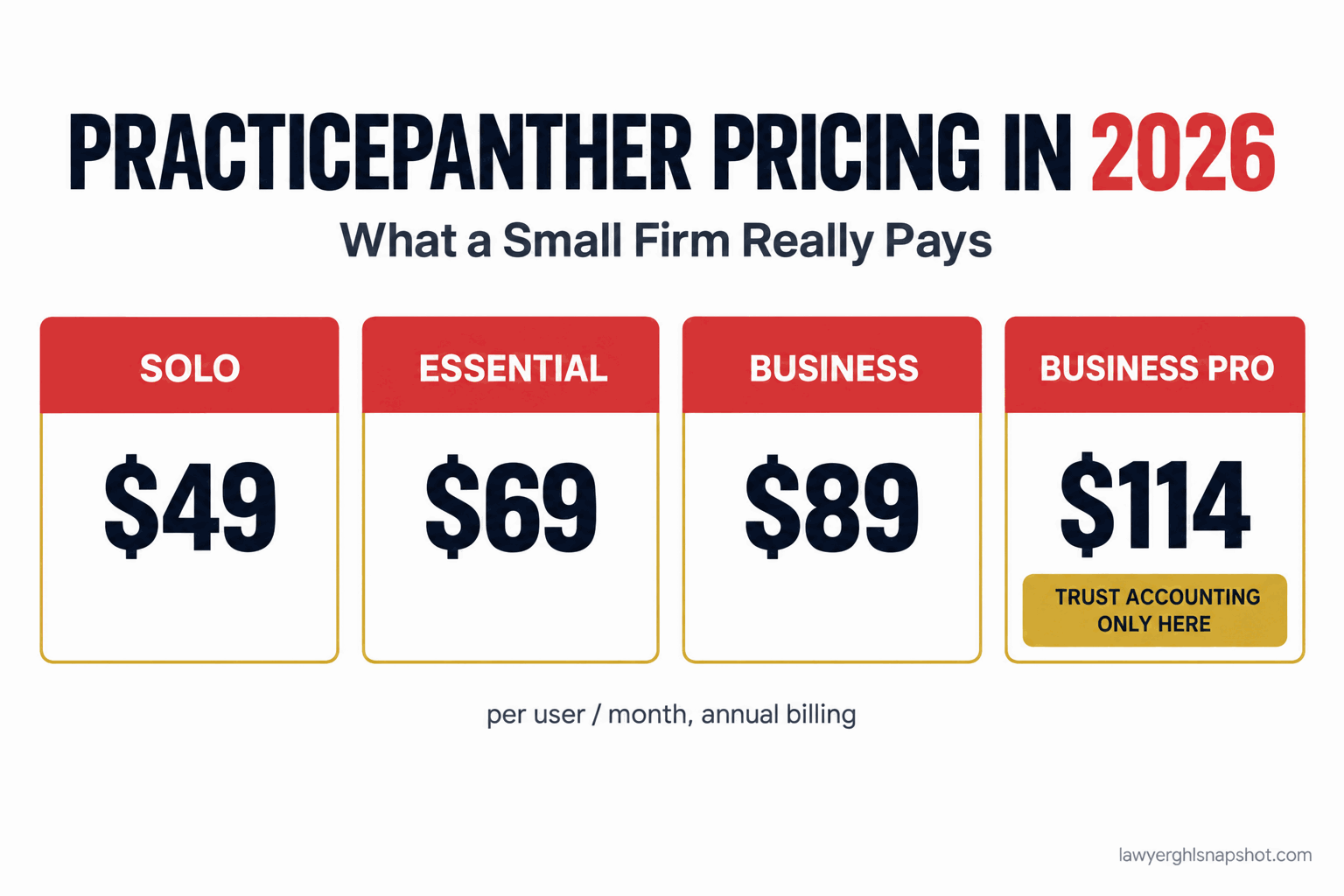
Here is the short answer. PracticePanther does publish its prices, which already puts it ahead of Smokeball and Filevine. On annual billing it runs $49, $69, $89 and $114 per user per month across Solo, Essential, Business and Business Pro (PracticePanther). The catch is not the sticker. The headline $49 seat is missing the things most firms walk in for, and trust accounting, the feature that protects your IOLTA account and your license, only lives in the top $114 tier.
Key Takeaways
- PracticePanther publishes real prices. Four annual tiers: Solo $49, Essential $69, Business $89, Business Pro $114 per user per month. Monthly adds $10 a seat (PracticePanther).
- Trust accounting is top-tier only. Trust accounting and reconciliation sit in Business Pro ($114). If IOLTA compliance matters, and it should, you are not shopping the $49 seat.
- Texting, intake forms and eSignature start at Business ($89), two rungs up from the entry price.
- The fees the page skips: PantherPayments processing rates are not published, court-deadline calculation needs a separate LawToolBox subscription, and the cost scales with every hire.
- Cheaper paths exist. The leak that costs small firms most is unanswered intake, not case management, and a flat-fee automation layer fixes it without a per-seat tax.
Table of contents
- Does PracticePanther actually publish its prices?
- The four PracticePanther tiers, and what each really includes
- What does PracticePanther actually cost in 2026?
- The tier trap: where trust accounting really lives
- The fees nobody puts in the demo
- What PracticePanther costs at three firm sizes
- Is PracticePanther worth it, and who is it for?
- 3 cheaper ways to get the same result
- Steal this: the email that forces real numbers
- The compliance angle vendors skip
- Common objections
- Frequently asked questions
Does PracticePanther actually publish its prices?
Yes, and that deserves credit. Open Smokeball’s pricing page and you get four plan names and zero dollar figures. Open Filevine’s and you get a demo request. Open PracticePanther’s and you get an actual table: four tiers, a per-user monthly rate on each, and an annual discount spelled out as “Save $120 per user per year” (PracticePanther). For a firm owner trying to budget, that transparency is worth something.
So this teardown is not about unmasking a hidden price. It is about a quieter trap: the published number is honest, but it is the price for the plan that does the least, and the gap between what you saw and what you pay is the tier ladder plus a couple of line items the page leaves off.
The four PracticePanther tiers, and what each really includes
PracticePanther sells four plans, and the climb between them is where your real cost is decided (PracticePanther).
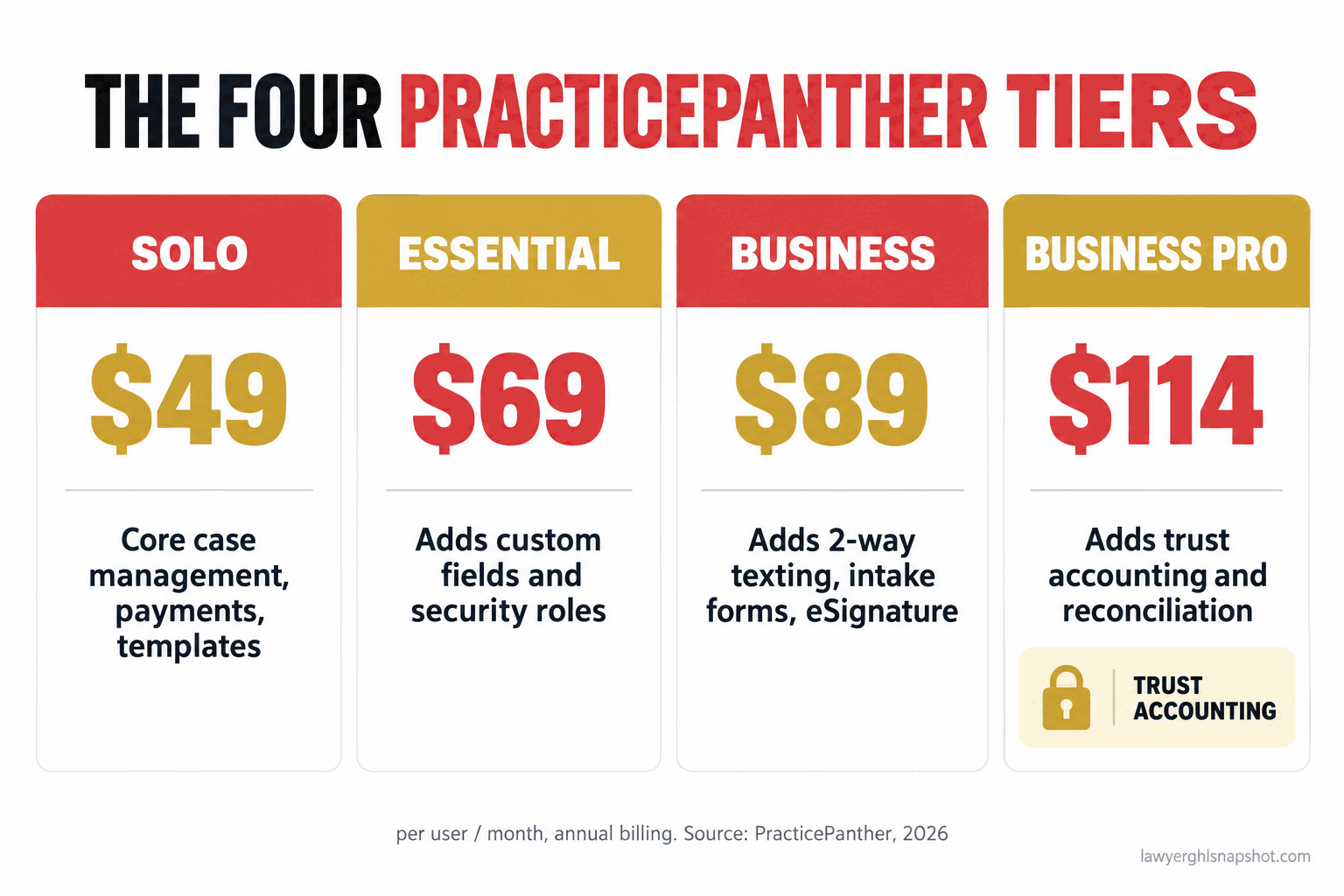
Solo is the entry seat, $49 per user per month on annual billing. You get the core: contact and matter management, time and expense tracking, a secure client portal, document templates, task and event workflows, native payments through PantherPayments, and the mobile apps. For a one-person shop that bills simply, it covers the basics.
Essential ($69) adds what a firm needs the moment it is more than one person: custom fields, custom security roles so staff do not see everything, invoice read alerts, and support for multiple bank accounts.
Business ($89) is where client-facing features arrive: native two-way texting, intake forms, native eSignature with unlimited sends, an attorney revenue report, and LEDES billing for insurance-defense work. To text clients and send engagement documents inside the platform, this is your floor, not Solo.
Business Pro ($114) sits at the top. It adds PantherAccounting Plus, trust accounting, operating accounting, enhanced reconciliation, and general-ledger, receivables and expense management.
Notice the shape. The $49 entry gets you a database and a timer. The features a working firm leans on, texting, intake, eSignature and above all trust accounting, are spread across the top two tiers, so the price you anchor on is rarely what you end up paying.
What does PracticePanther actually cost in 2026?
The published annual rates are Solo $49, Essential $69, Business $89 and Business Pro $114 per user per month, and monthly billing adds ten dollars a seat on every plan (PracticePanther). Review aggregators report the same figures (Capterra, Software Advice).
Put it next to the other tool that publishes prices. Clio lists seats from $49 to $149 per user (Clio), so PracticePanther’s top tier lands below Clio’s, which is part of its pitch. The honest comparison is not entry seat against entry seat, but the seat that holds the features you need against the seat that holds them on the other platform.
For the full field, every major vendor and what each one hides, our legal case management software pricing breakdown is the pillar this post sits under, alongside the Smokeball pricing and MyCase pricing teardowns.
The tier trap: where trust accounting really lives
This is the part that catches small firms, and it is worth slowing down for.
Trust accounting is not a nice-to-have. If you hold client money in an IOLTA account, which almost every firm that takes retainers does, most trust-account discipline is sloppiness, not theft: a missed reconciliation, commingled funds, a disbursement before a deposit cleared. We walk through the seven ways small firms get disciplined in our law firm trust accounting compliance guide. This is a license-level risk, not a bookkeeping convenience.
So where does PracticePanther put trust accounting? In Business Pro only, the $114 top tier, bundled with PantherAccounting Plus and reconciliation (PracticePanther). Not Solo, Essential or Business. If protecting your trust account inside your case-management tool is why you are shopping, your real entry price is $114 per user per month, more than double the headline $49.
You have two honest options. Pay for Business Pro and get integrated trust accounting, or run a cheaper tier and keep trust accounting in dedicated software you reconcile against, which plenty of disciplined firms do. What you cannot do is budget for the $49 seat and assume the compliance tooling comes with it. It does not.
The fees nobody puts in the demo
PracticePanther’s page is more honest than most, but a few costs still live off the table. Pin these down before you sign.
Payment-processing rates. PantherPayments is built into every tier, which is useful, but the pricing page does not show the processing rate on credit cards and eChecks (PracticePanther). Those percentages come off every client payment, so on a firm collecting six figures a year they matter more than a ten-dollar seat difference. Ask for the exact card and eCheck rates in writing.
Court-deadline calculation. Deadline and docketing calculation runs through a separate LawToolBox subscription, not the per-user fee. If rules-based deadlines are part of your practice, that is a real line item on top.
The per-seat climb. The structural one. Every price above is per user, so the tool that feels fair for a solo gets more expensive the year you finally hire. Your vendor gets a raise every time you grow, and you never voted for it.
Migration and export. PracticePanther says a dedicated team handles migration in, with no price stated, and that export is available any time. Confirm both in writing. “We support migration” and “we do it for you at no cost” are different sentences, and your export terms are your switching cost.
What PracticePanther costs at three firm sizes
Per-seat math that looks gentle for a solo turns heavy fast. Here is the annual cost on a Business seat ($89 per user per month), the realistic floor for texting and intake, with Business Pro beside it where trust accounting is needed.
The solo (1 to 2 seats). At Business, one seat is about $1,068 a year, two seats about $2,136. Add trust accounting at Business Pro and one seat is about $1,368. Affordable either way, but the $49 Solo plan does not include the texting, intake or trust features a growing solo usually wants.
The 5-attorney firm (8 seats). Five attorneys plus three staff at Business is about $8,544 a year. Push to Business Pro for integrated trust accounting and it is about $10,944. This is the firm that budgeted at the $49 headline and now pays four to five times that.
The 15-attorney firm (25 seats). At Business, 25 seats is about $26,700 a year. At Business Pro, about $34,200, before processing fees and LawToolBox. At this size, a few dollars of seat difference is thousands a year.
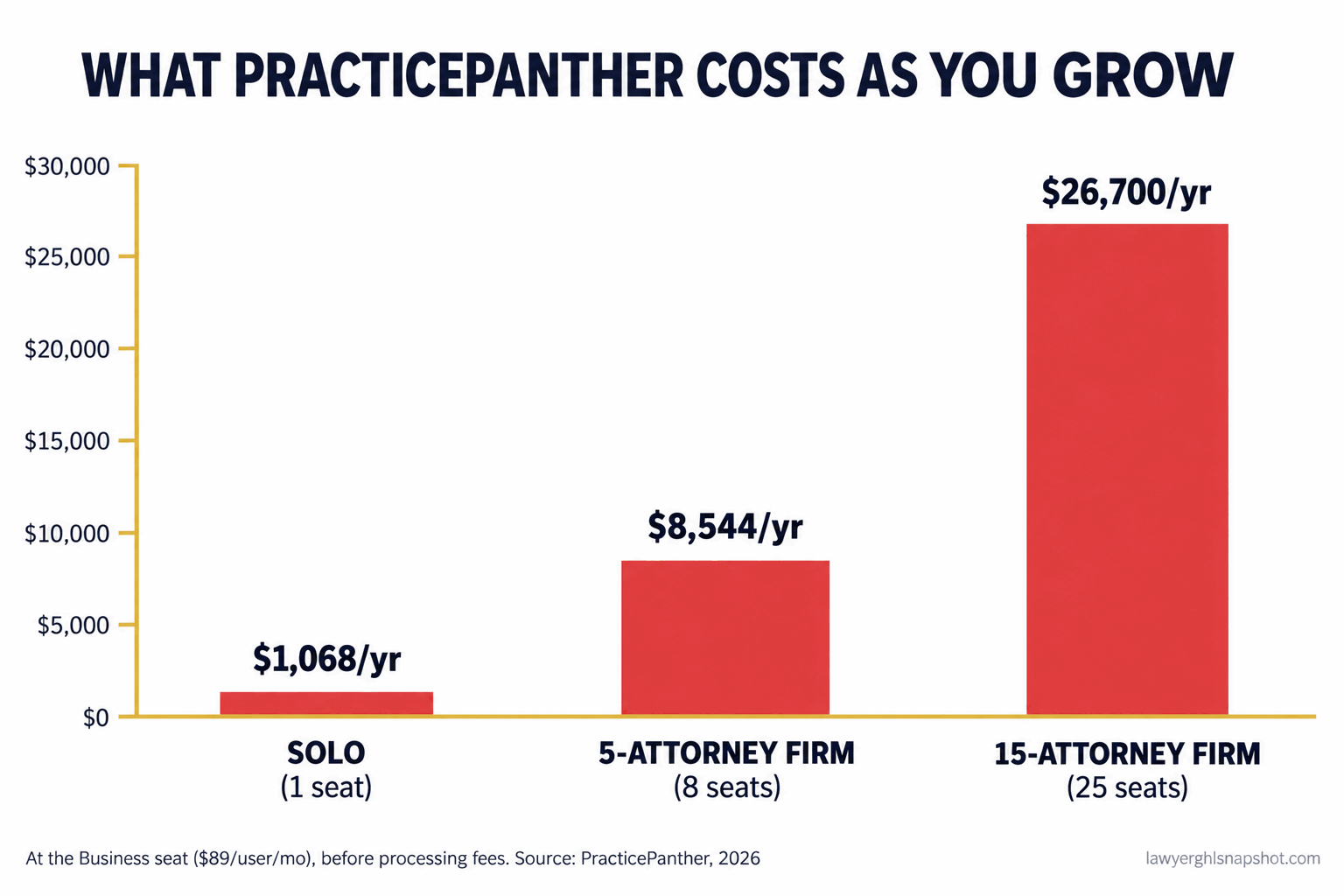
Annual cost at the published Business rate ($89/user/mo) × 12 × seats, before PantherPayments processing fees and LawToolBox. Source: PracticePanther, 2026. Business Pro ($114/user/mo) with trust accounting runs higher.
A large share of that spend is the intake and texting layer, which does not have to be priced per head.
Is PracticePanther worth it, and who is it for?
PracticePanther is a solid, fairly priced tool, and the published pricing makes it easy to recommend to the right firm.
It is worth it when you want a clean case-management core with payments built in and a price you can read, you are comfortable on the Business or Business Pro tier for the features that matter, and you bill in a way the platform supports.
It is a weaker fit when your real bottleneck is leads you never answered, you expected the $49 seat to include trust accounting or texting, or you are growing fast and the per-seat climb will outrun the value. For transparent alternatives, see our best Clio alternatives for small law firms rundown and the Clio vs MyCase comparison.
Here is the part no case-management tool fixes. In Clio’s Legal Trends data, the average lawyer’s utilization rate is 38 percent, about 3.0 billable hours in an 8-hour day, with an 88 percent realization rate and a 93 percent collection rate (Clio, 2025). A better database does not move those numbers. The hours you lose are lost before a matter exists, in consultations you never booked, the gap we cover in speed to lead and missed-call text-back.
3 cheaper ways to get the same result
1. Run a lower tier and keep trust accounting separate. If the only reason you are climbing to Business Pro is trust accounting, a dedicated trust-ledger tool plus disciplined three-way reconciliation can cost less than the per-seat jump across your firm. Pair it with tight timekeeping, which we cover in the true cost of manual time tracking.
2. Keep your current system and fix the real leak. Most small firms do not lose money inside their case-management tool. They lose it before a matter exists, in unanswered calls and no-show consultations. Bolt a flat-fee intake layer onto whatever you already run, PracticePanther included.
3. Replace the intake-and-follow-up layer with automation. Our GoHighLevel-based system handles 24/7 answering, instant follow-up, reminders, review requests and database reactivation as a one-time install, refined across more than 80 U.S. law firm deployments. It is a flat fee, not a per-user subscription, so it does not get more expensive the year you add two paralegals. See what is included on the pricing page.
Steal this: the email that forces real numbers
PracticePanther prints its seat prices, so you are halfway there. What is left are the numbers that live off the table. Send this before you commit, and make specific written answers the price of your signature.
Subject: A few numbers before we move forward
Hi [Rep], the published tier pricing is clear, thank you. Before I roll this out I need written answers to the questions below so I can take a real annual figure to my partners. A range is fine where it has to be. Once I have these, the next call is a decision, not another demo.
The seven questions that unmask the total cost:
- The exact PantherPayments processing rate for credit cards and for eChecks, as a percentage and any per-transaction fee.
- Confirmation that trust accounting and reconciliation are only in Business Pro, and the per-user rate for Business Pro at my seat count on annual billing.
- Whether court-deadline or docketing calculation needs a separate LawToolBox subscription, and what that costs.
- Whether data migration from my current system is genuinely done for me at no cost, or quoted separately, and who does the work.
- What it costs to export all of my data if I leave, in what format, and whether there is any delay or fee.
- Any annual renewal increase, and what happens to my rate if I reduce seats mid-year.
- Which features in the demo require the Business or Business Pro tier specifically, so I am not budgeting on the Solo price.
If a rep will print the seat price but will not put those seven numbers in an email, you have learned how the relationship goes after you sign.
The compliance angle vendors skip
Marketing and intake tools routinely propose arrangements the bar rules do not allow, and it is your license on the line.
- ABA Model Rule 7.1 bars any false or misleading communication about you or your services (ABA). If a tool’s automated marketing overstates results, that falls on you.
- Rule 7.2 permits paying for lead generation only when the generator does not recommend, vouch for or select the lawyer. A “we send you signed cases for a cut” pitch tends to cross that line fast.
- Rule 7.3 governs solicitation, and automated outbound to people who never asked to hear from you is where firms get into trouble.
- Non-lawyer fee-sharing is broadly banned, which rules out the revenue-share-on-signed-cases model some marketing vendors propose.
One more, because the AI features in these platforms are heading this way. Any client-facing chatbot must make clear it is not an attorney and should route or schedule, not answer “what are my chances.” A bot that gives legal predictions risks unauthorized practice of law and blows up privilege. Our law firm texting and AI chatbot compliance guide covers the consent language and the lines you cannot cross.
Common objections
“But PracticePanther is cheaper than Clio, so it is the budget pick.” On the top tier, yes, Business Pro at $114 sits below Clio’s $149 top seat. But compare the tier that holds the features you need, not entry against entry. If you need trust accounting, you are at $114 either way.
“I already pay for a case-management tool, isn’t switching the point?” Not necessarily. If your core works, the expensive problem is usually the intake and follow-up layer, which you can fix without migrating to a second per-seat platform.
“Published pricing means no surprises.” It removes one. Processing rates, the LawToolBox add-on, and the tier where trust accounting lives are the three that get firms anyway. Ask about all three up front.
Frequently asked questions
How much does PracticePanther cost per user in 2026?
On annual billing, Solo is $49, Essential $69, Business $89, and Business Pro $114 per user per month. Monthly billing adds ten dollars a seat on every plan. Those figures come from PracticePanther's own pricing page and are corroborated by review sites.
Which PracticePanther plan includes trust accounting?
Trust accounting, operating accounting and reconciliation are in Business Pro only, the top tier at $114 per user per month, bundled as PantherAccounting Plus. A firm that needs IOLTA-compliant trust tooling inside PracticePanther is shopping the top tier, not the $49 Solo seat.
Does PracticePanther have hidden fees?
The seat prices are published, which is welcome. The costs that are not on the page are the PantherPayments processing rates on cards and eChecks, a separate LawToolBox subscription for court-deadline calculation, and the per-seat climb as you hire. Confirm the processing rates and any migration or export terms in writing.
What tier do I need for texting and intake forms?
Native two-way texting, intake forms and native eSignature start at Business ($89 per user per month). Solo and Essential do not include them, so if client texting or intake is why you are evaluating PracticePanther, your real floor is Business, not Solo.
Is PracticePanther worth it for a small or solo firm?
It can be, if you value published pricing and want a clean case-management core with payments built in. The caveats: the $49 Solo plan omits texting, intake and trust accounting, so budget for the tier that holds the features you need. And no case-management tool fixes the real leak for most small firms, which is consultations never booked.
What are cheaper alternatives to PracticePanther?
For case management, Clio publishes seats from $49 to $149 per user, and MyCase and Smokeball cover similar ground. For the part that grows revenue, intake and follow-up, a flat-fee automation layer handles answering, follow-up, reminders and reactivation for one price, with no per-seat cost as you add staff.
Back to that kitchen table. The number you penciled in was honest, PracticePanther really does charge forty-nine dollars for a Solo seat. It just was not your number, because the firm you run needs texting, intake and a trust account that keeps you out of trouble, and those live higher up the ladder. Get the seven answers in writing, price the tier that holds the features you need across every seat you will add, and remember where the money actually leaks. For most small firms it is not hiding in a better database. It is dripping out of the phone that rings while you are in court, and that is a far cheaper problem to fix.