It is 4:50pm on a Friday and the front desk puts a call through. It is the client from the March car wreck, the third time this month, asking the same thing: any news on my case? There is no news. The demand package is still with the adjuster. But now a paralegal spends ten minutes calming someone down, you lose the back half of your afternoon, and the client hangs up feeling like they had to chase you for a straight answer.
That call is not a communication problem on one file. It is a system gap. The client has no idea what is happening because nobody told them, and nobody told them because telling them depends on someone remembering to. Here is the system that keeps every client informed on a schedule, the copy you can lift word for word, and the ethics lines that keep automated updates clean.
Key Takeaways
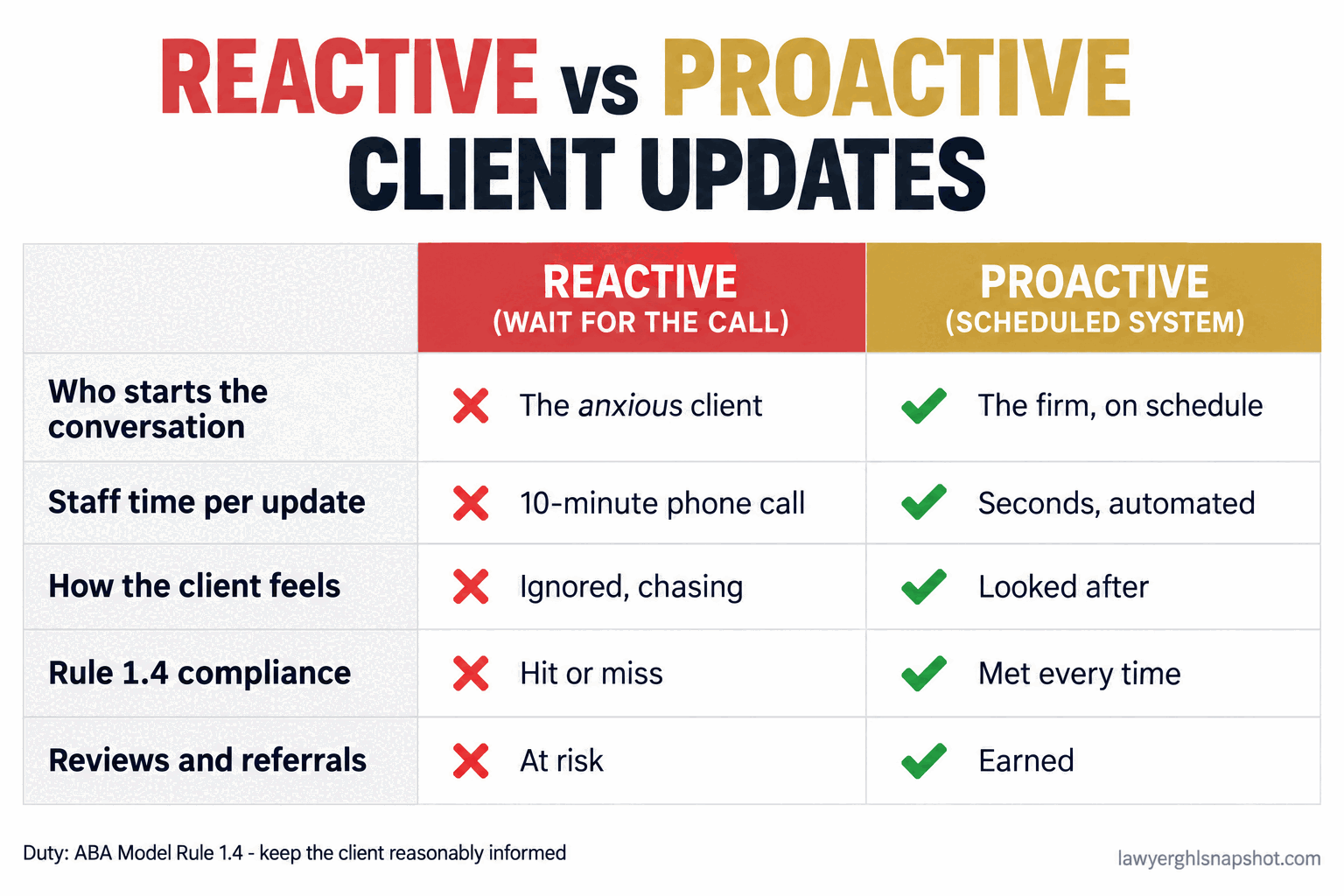
- Clients leave over silence, not outcomes. Communication failures are “one of the most frequent sources of both professional discipline and malpractice risk,” and bar reports routinely list them among the top five violations (WSBA). ABA Model Rule 1.4 requires you to keep the client “reasonably informed about the status of the matter” (ABA).
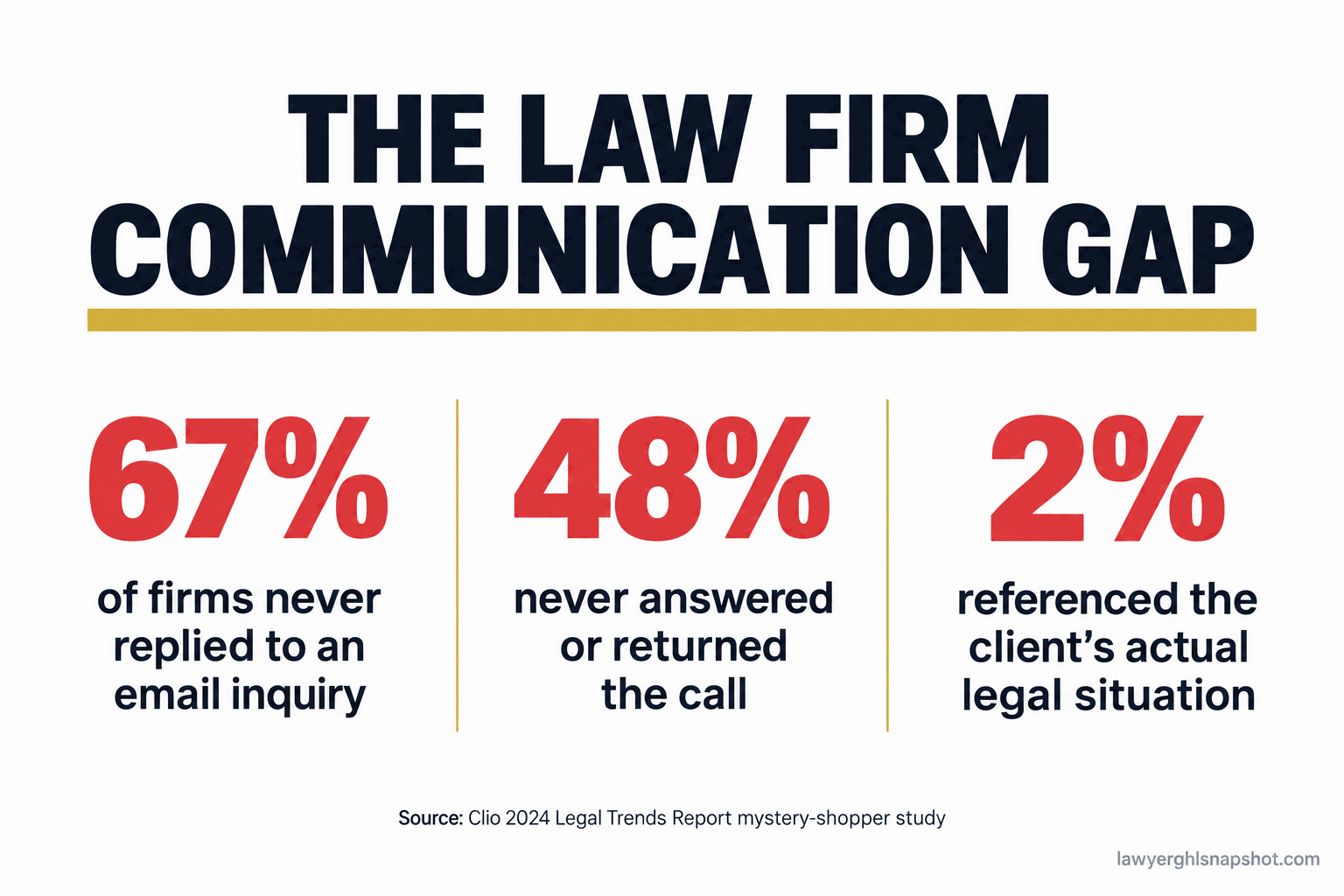
- The firms clients reach are rare. In Clio’s mystery-shopper study, 67% of firms never replied to an email and 48% never answered or returned the call (Above the Law, citing Clio).
- Automation keeps the clock, not the judgment. The system sends the update; a human writes anything that touches legal substance. Status messages route and inform. They never answer “what are my chances.”
Table of contents
- Why the status-check call costs more than time
- The client update system at a glance
- Stage 1: Set the update cadence in the engagement letter
- Stage 2: Confirm the matter is open within 24 hours
- Stage 3: Map the milestones that deserve an update
- Stage 4: Automate the proactive milestone message
- Stage 5: Route the inbound “any update?” the right way
- Stage 6: Send the no-news check-in
- Stage 7: Close the matter and earn the review
- The same system at three firm sizes
- The compliance lines vendors skip
- Common objections
- Frequently asked questions
Why the status-check call costs more than time
Here is the part that stings. When a client fires their lawyer or files a grievance, it usually is not because the case went sideways. It is because they felt abandoned while it played out. The Washington State Bar puts it plainly: failure to communicate is “one of the most frequent sources of both professional discipline and malpractice risk,” and annual reports “typically list communication failures among the top five violations” (WSBA). You can win the matter and still lose the client, the review, and the referral, just by going quiet.
The rule you are measured against is ABA Model Rule 1.4: a lawyer shall “keep the client reasonably informed about the status of the matter” (ABA). A status-update system is how you hit that standard every time instead of when you happen to remember. Most firms are not close. In Clio’s mystery-shopper study, researchers contacted 1,000 firms by email and 500 by phone; two out of three never replied to the email, and nearly half never answered or returned the call (Above the Law, citing Clio).
Now the money side. The average lawyer runs a 38% utilization rate, roughly 3.0 billable hours out of an 8-hour day (Clio Legal Trends). You do not have five hours of slack to donate to repeat status calls. Every ten-minute “any update?” is carved out of the thin slice of the day you get paid for.
The fix is not “communicate more.” It is to make communication happen on a schedule, triggered by the matter itself, so the client hears from you before they feel the urge to call. Seven stages do that.
The client update system at a glance
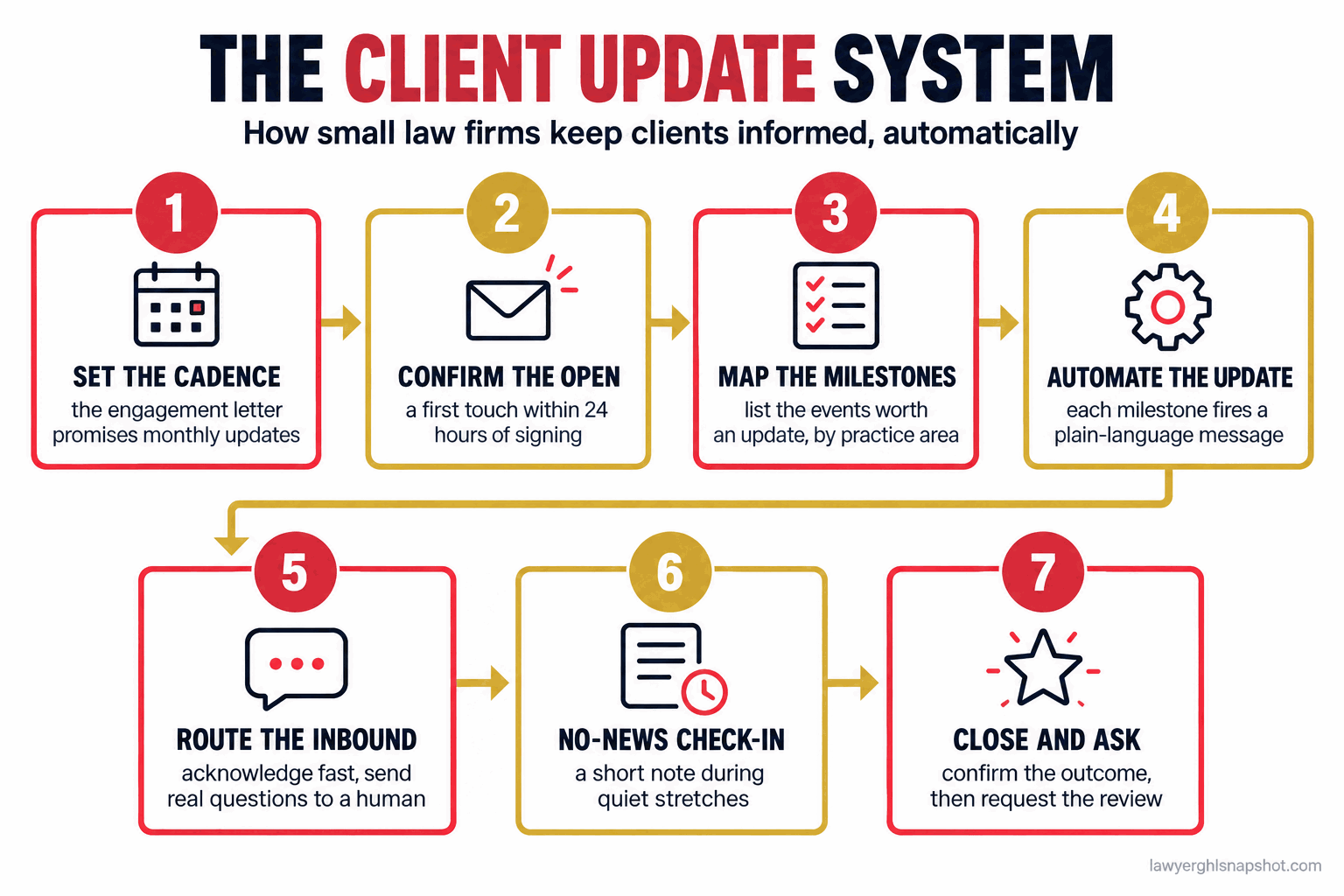
They take a matter from signed to closed with the client informed the whole way. Stage 1 is human work you do once. Everything after runs off the file.
- •Stage 1
Set the cadence
The engagement letter tells the client how and how often they will hear from you.
- •Stage 2
Confirm the open
A first touch inside 24 hours so the client knows the matter is live.
- •Stage 3
Map the milestones
List the events in each practice area worth an automatic update.
- •Stage 4
Automate the update
Each milestone fires a plain-language message to the client.
- •Stage 5
Route the inbound
An 'any update?' gets acknowledged fast and sent to the right human.
- •Stage 6
No-news check-in
During quiet stretches, a short touch that says nothing changed and you are on it.
- •Stage 7
Close and ask
Wrap the matter, confirm next steps, and request the review while goodwill is high.
Stage 1: Set the update cadence in the engagement letter
Expectations you never set are expectations you will always miss. Tell the client, in writing, how they will hear from you and roughly how often. A client who knows an update lands on the first of the month does not call on the fifteenth.
Steal this clause (run it past your own ethics counsel first):
Staying in touch. We will send you a status update on your matter at least once a month, and sooner whenever something meaningful happens, such as a filing, an offer, or a scheduled hearing. Updates come by [text and email] to the contact details you gave us. If you want an update between scheduled messages, reply to any of them or call the office, and we will get back to you within one business day. Some stretches of a case are quiet by nature, and we will tell you when that is so you are never left guessing.
How it breaks: You promise weekly updates the matter does not generate, so you either go silent or pad. Promise a floor you can always hit, monthly, then beat it when real events happen.
Stage 2: Confirm the matter is open within 24 hours
The gap between signing and the first real event is where early doubt creeps in. The client just handed you their problem and hears nothing. Close that gap with one confirmation inside a day. It is not a legal update. It is a “you are in good hands and here is what happens next” message. This is the same speed logic that drives intake, and if you have not tightened that side, our guide to speed-to-lead for law firms covers the front of the funnel.
Steal this (sent automatically within 24 hours of signing):
Hi [First name], welcome aboard, and thank you for trusting [Firm] with your [matter type]. Your matter is officially open and assigned to [attorney/paralegal]. Here is what happens next: [one plain sentence on the first step]. You do not need to do anything right now. We will reach out if we need a document or a decision, and you will get your first status update by [date]. Talk soon, [Firm].
How it breaks: The welcome is generic and could have come from any firm, so it reassures nobody. Name the person handling the file and the literal next step. Specificity is what makes a client exhale.
Stage 3: Map the milestones that deserve an update
An update system is only as good as the list of events that trigger it. Once per practice area, write the handful of moments a client actually cares about, not every internal task. They need a message when something changes about their case or their odds of a result.
| Practice area | Milestones worth an automatic update |
|---|---|
| Personal injury | Treatment complete, demand sent, adjuster responded, offer received, suit filed, settlement funded |
| Family law | Petition filed, served, hearing scheduled, temporary orders entered, final order signed |
| Estate planning | Draft ready for review, revisions sent, signing scheduled, documents executed and delivered |
| Criminal defense | Discovery received, motions filed, plea offer received, hearing or trial date set |
| Immigration | Filed, receipt notice received, biometrics scheduled, RFE received, interview scheduled, decision issued |
Each of these is an event your case-management or intake system already knows about, so a status change can fire a message. The milestone map is the bridge between “something happened on the file” and “the client heard about it.”
How it breaks: The list is too long, so clients tune out and the important updates drown. Pick the five to eight that move the needle. Silence between real milestones is fine when Stage 6 covers the gaps.
Stage 4: Automate the proactive milestone message
This is the engine. When a matter hits a mapped milestone, the system sends a short, plain-language message: what happened and what it means, no legalese or false promises. Each message is pre-written per milestone, so it is consistent and reviewed once instead of rewritten every time.
Steal this (personal injury, demand sent):
Hi [First name], an update on your case: we sent your demand package to the insurance company today. That is the formal request for compensation, backed by your medical records and the details of what happened. The next step is their response, which typically takes a few weeks. We will tell you the moment we hear back. Questions in the meantime? Just reply. [Firm].
Steal this (family law, hearing scheduled):
Hi [First name], your hearing is scheduled for [date] at [time], [location]. [Attorney] will be with you and will walk you through what to expect beforehand. We will send a reminder as the date gets closer. If that date is a problem, let us know right away. [Firm].
Notice what these do and do not do. They report facts and next steps. They never say “we will win” or “you should accept this” or anything that reads as legal advice from a machine.
How it breaks: The message gives a number or prediction it should not, like “expect $40,000” or “done by March.” Automated copy stays descriptive. Anything that commits to an outcome or a firm date is a human’s call, written for that client.
Disclosure: the GoHighLevel link above is an affiliate link. If you sign up through it we may earn a commission, at no extra cost to you.
Stage 5: Route the inbound “any update?” the right way
No system kills every inbound question, and it should not try. A client who texts asking for an update is giving you a chance to look responsive. Acknowledge fast, answer what is factual, and route anything substantive to a human, without the automation ever pretending to be the lawyer.
An auto-reply can confirm receipt, set a callback expectation, and share a factual status the system already knows, like “your hearing is still set for the 14th.” It cannot interpret, advise, or guess. The second a question is “should I take the offer?” or “what are my chances?”, the only correct move is to route it to a person. Answering that with a bot is how you wander into unauthorized practice and privilege trouble. We go deep on where that line sits in the law firm texting and AI chatbot compliance guide.
Steal this (instant auto-acknowledgment to an inbound text):
Hi [First name], got your message and we are on it. [Attorney/paralegal] will get back to you within one business day. If this is urgent, call the office at [number] and ask for [name]. For a quick reference, your matter’s current status is: [auto-filled factual status]. Thanks for reaching out. [Firm].
That one reply does most of the work. The client feels heard in seconds and knows when a human follows up. The ten-minute panic call becomes a thirty-second exchange.
How it breaks: The auto-reply tries to be helpful about substance and says “based on your situation you should be fine.” That is advice, from a machine, with your name on it. Keep the bot to acknowledgment, factual status, and routing. Full stop.
Stage 6: Send the no-news check-in
The hardest stretch to manage is the one where genuinely nothing is happening. Discovery is out, the adjuster is sitting on the file, and clients read silence as neglect, so they call. The fix is a short, honest message: there is no change, here is why that is normal, and you are watching it.
Steal this (sent on a cadence during a known quiet phase):
Hi [First name], a quick check-in on your matter. There is no change to report right now, which is expected at this stage. We are waiting on [the insurer’s response / the court / opposing counsel], and that part is out of our hands and often takes [rough window]. We are tracking it and will reach out the moment it moves. Nothing you need to do. Hope you are doing well. [Firm].
How it breaks: The no-news message goes out so often it becomes noise, or is so vague it raises more questions than it answers. Once every two to three weeks during a quiet phase is plenty, and always name what you are waiting on. For the early-relationship version of this, see our client onboarding playbook.
Stage 7: Close the matter and earn the review
When the matter ends, goodwill is at its peak. Use it. A closing message confirms the outcome and next steps, sets expectations for anything that lingers like funds disbursement, and then, only after the client signals satisfaction, asks for a review. Asking at the right moment is the difference between a five-star review and a form the client ignores.
Steal this (matter close, then review ask on a short delay):
Hi [First name], your matter is now resolved. [One plain sentence on the outcome and any remaining step, like funds disbursing within X days.] It has been a privilege to represent you. If anything comes up down the road, you know where to find us.
[Sent two to three days later, only if the client responded positively:] Hi [First name], one small favor. If you were happy with how things went, a short Google review helps other people in your situation find a firm they can trust: [review link]. No pressure, and thank you again. [Firm].
Route that review request through a quick satisfaction check, so public-review links go to happy clients and unhappy ones get caught privately first. Our guide to getting more Google reviews for your law firm walks through that gate.
How it breaks: The review ask rides along in the same breath as the closing message, so it reads as transactional, or it goes to every client including the frustrated ones. Separate the close from the ask, and gate the ask on a positive signal.
The same system at three firm sizes
The seven stages do not change with headcount. What changes is how much runs on software versus a person.
The solo or two-person shop. Stages 2, 4, 5, and 6 are survival tools, because you cannot remember to update thirty clients while in a deposition. Lean hard on automation and personally handle only the substantive callbacks the system routes. Start the milestone map with your busiest practice area.
The 3 to 7 attorney firm. The risk shifts from “nobody sends updates” to “everybody assumes someone else did.” Make the system the source of truth: every mapped milestone fires automatically, and one person owns the routed inbound queue so acknowledgments do not fall between desks.
The 8 to 15 attorney firm. The issue is consistency across attorneys with different habits. Standardize the pre-written milestone library so every client gets the same quality of update, and add reporting on which matters have not had a client touch in 30 days. Firms replacing a pile of disconnected tools should read the signs your software costs more than it saves first.
The compliance lines vendors skip
Automation makes communication easy, which is exactly why it needs guardrails. Three rules frame it.
Rule 1.4 is the floor. The duty to keep clients reasonably informed is yours, and it does not transfer to a tool (ABA). The system helps you meet it consistently; it does not excuse a substantive question a client is entitled to have a lawyer answer. Build the routing so real questions reach a human promptly.
Confidentiality travels with the message. Model Rule 1.6 protects information relating to the representation, and texting status updates sends it over channels the client chose. Get the client’s informed consent to the channel up front, which the Stage 1 clause starts, and keep automated messages light on sensitive specifics. “We received a response from the other side, [attorney] will call to discuss” is safer than spelling out the substance in an SMS that could land on a lost phone.
Texting carries consent rules. Automated, recurring texts sit under TCPA and carrier A2P 10DLC requirements, so you need real opt-in, a clear way to stop, and registered messaging. Skipping it risks a carrier block and a complaint. The full breakdown lives in our texting and AI chatbot compliance guide.
Common objections
“Won’t automated updates feel impersonal?” They feel more personal than silence, which is the real alternative. A client does not experience a milestone text as a robot. They experience it as a firm on top of their case. The messages use the client’s name and real case facts and invite a reply to a human. What feels impersonal is having to call three times to get a straight answer.
“What if I already pay for Clio or MyCase?” Keep it. Your case-management software is the system of record for the matter. The update layer sits on top, listens for status changes, and handles the client-facing messaging those tools do lightly or not at all. If you are weighing those platforms, our Clio vs MyCase comparison breaks down what each does on the client-communication side.
“Isn’t sending case details by text a confidentiality risk?” It can be if you dump substance into every message. Done right, it is not. Get channel consent up front, keep automated texts factual and light on sensitive detail, and push anything substantive to a call. The risk is not the channel; it is what you put in it. And you do not need to be technical to run any of this: the milestone map and the message copy are the real work, and the wiring is a one-time setup.
Frequently asked questions
How often should a law firm update clients on their case?
Set a floor of at least once a month and beat it whenever a real milestone happens, such as a filing, an offer, or a scheduled hearing. Promise a cadence you can always hit, then overdeliver. During quiet stretches, a short no-news check-in every two to three weeks keeps the client from reading silence as neglect.
What does ABA Model Rule 1.4 require for client communication?
Rule 1.4 requires a lawyer to keep the client reasonably informed about the status of the matter and to promptly comply with reasonable requests for information. A status-update system is the operational way to meet that standard consistently. The duty stays with the lawyer; automation helps you honor it.
Can a law firm text clients case updates without breaking confidentiality?
Yes, if you do two things. Get the client's informed consent to the channel up front, and keep automated messages factual and light on sensitive specifics, pushing anything substantive to a call. A text saying a response arrived and the attorney will call to discuss is safer than one that spells out the substance.
Is it unauthorized practice of law to let a chatbot answer client questions?
It can be if the bot interprets, predicts outcomes, or gives advice. Keep automated messages to acknowledgment, factual status the system already knows, and routing to a human. The moment a question needs legal judgment, such as whether to accept an offer, a lawyer answers it.
Do automated client texts have to comply with TCPA?
Yes. Automated and recurring texts to clients fall under TCPA and carrier A2P 10DLC rules, so you need genuine opt-in, an easy way to stop messages, and registered business messaging. It is straightforward to set up but not optional.
Here is where that Friday afternoon ends up once the system runs. The client from the March wreck does not call, because they got a text the day the demand went out and a check-in two weeks later saying the adjuster was sitting on it. Your paralegal keeps the back half of the afternoon, the client feels looked after, and a five-star review and a referral follow when the case settles. Nothing about the law changed. You just stopped letting silence do the talking.
If you want this built for you, connected to the tools you already run and installed in a day, start with our pricing, or book a walkthrough and we will map your milestones with you.