It is a Tuesday and you are 35 minutes into a Smokeball demo. The rep has shown you AutoTime quietly clocking the minutes you spend inside a Word document, and it looks genuinely good. Then you ask the only question a firm owner cares about, what does this cost my six-person practice per year, and the answer is a smile: “It depends on your firm, let’s build a custom quote.” You came for a number and you leave with a follow-up call. That is not a glitch. That is the pricing model working exactly as designed.
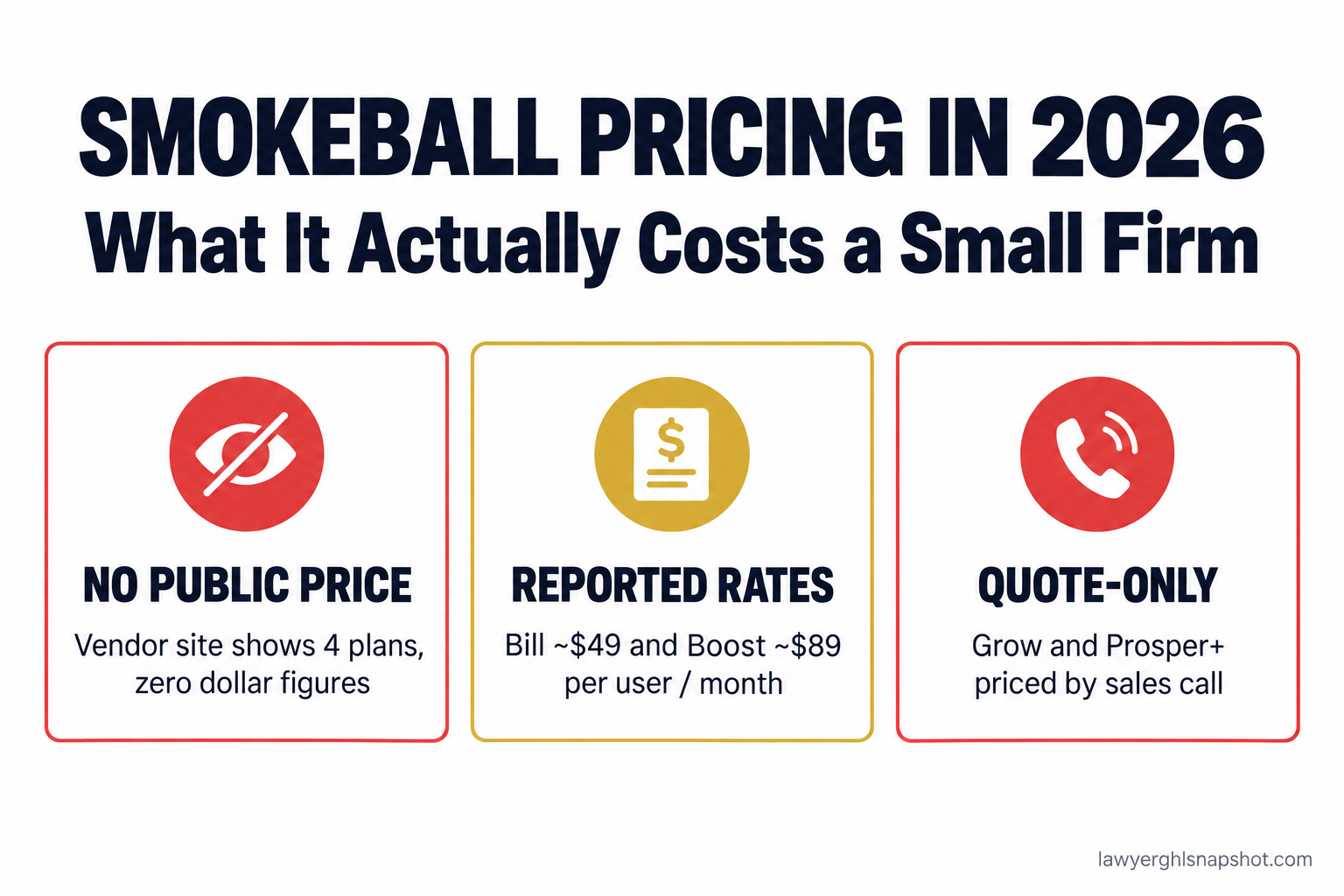
Here is the short answer. Smokeball does not publish a real price. Its pricing page lists four plans, Bill, Boost, Grow and Prosper+, with not one dollar figure beside any of them (Smokeball). Third-party sites report Bill around $49 and Boost around $89 per user per month, while Grow and Prosper+, the tiers that hold the features Smokeball sells you on, are quote-only. For an established, document-heavy firm on Windows that wants automatic time capture, it can earn its keep. For a lean or solo practice, the cost is hard to justify once you see the math.
Key Takeaways
- Smokeball publishes no real prices. Its pricing page shows four plan names and zero dollar figures, and says cost “depends on the number of users at your firm,” your plan, your contract term and add-ons (Smokeball).
- Reported rates: Bill around $49 and Boost around $89 per user per month (Capterra, G2). Grow and Prosper+ are quote-only.
- The feature they demo is in the tier they won’t price. AutoTime, Smokeball’s automatic time tracking, is included in Prosper+ and is an add-on for Grow (Smokeball).
- Setup is the hidden line. Implementation runs around $500 to $2,000 per user plus training, with 12- or 36-month contracts.
- Cheaper paths exist. Clio publishes seats from $49 to $149 per user (Clio), and a flat-fee automation layer covers intake and follow-up with no per-seat tax.
Table of contents
- Why won’t Smokeball just show you the price?
- The four Smokeball tiers, and what each really includes
- What does Smokeball actually cost in 2026?
- AutoTime: the feature you are really paying for
- The fees nobody puts in the demo
- What Smokeball costs at three firm sizes
- Is Smokeball worth it, and who is it for?
- 3 cheaper ways to get the same result
- Steal this: the email that forces a real quote
- The compliance angle vendors skip
- Common objections
- Frequently asked questions
Why won’t Smokeball just show you the price?
Open Clio’s pricing page and you see numbers. Open Smokeball’s and you see four plan names, a “Best Value” badge on Grow, and a request-a-demo button (Smokeball). The page even tells you why in its FAQ: pricing “depends on the number of users at your firm,” plus your plan, contract term and optional products.
Quote-only pricing anchors the price to how much your practice looks able to pay, and folds software, add-ons and a multi-year contract into one number that is hard to pull apart later. You cannot budget, and you have nothing to anchor against when the price climbs at renewal.
The four Smokeball tiers, and what each really includes
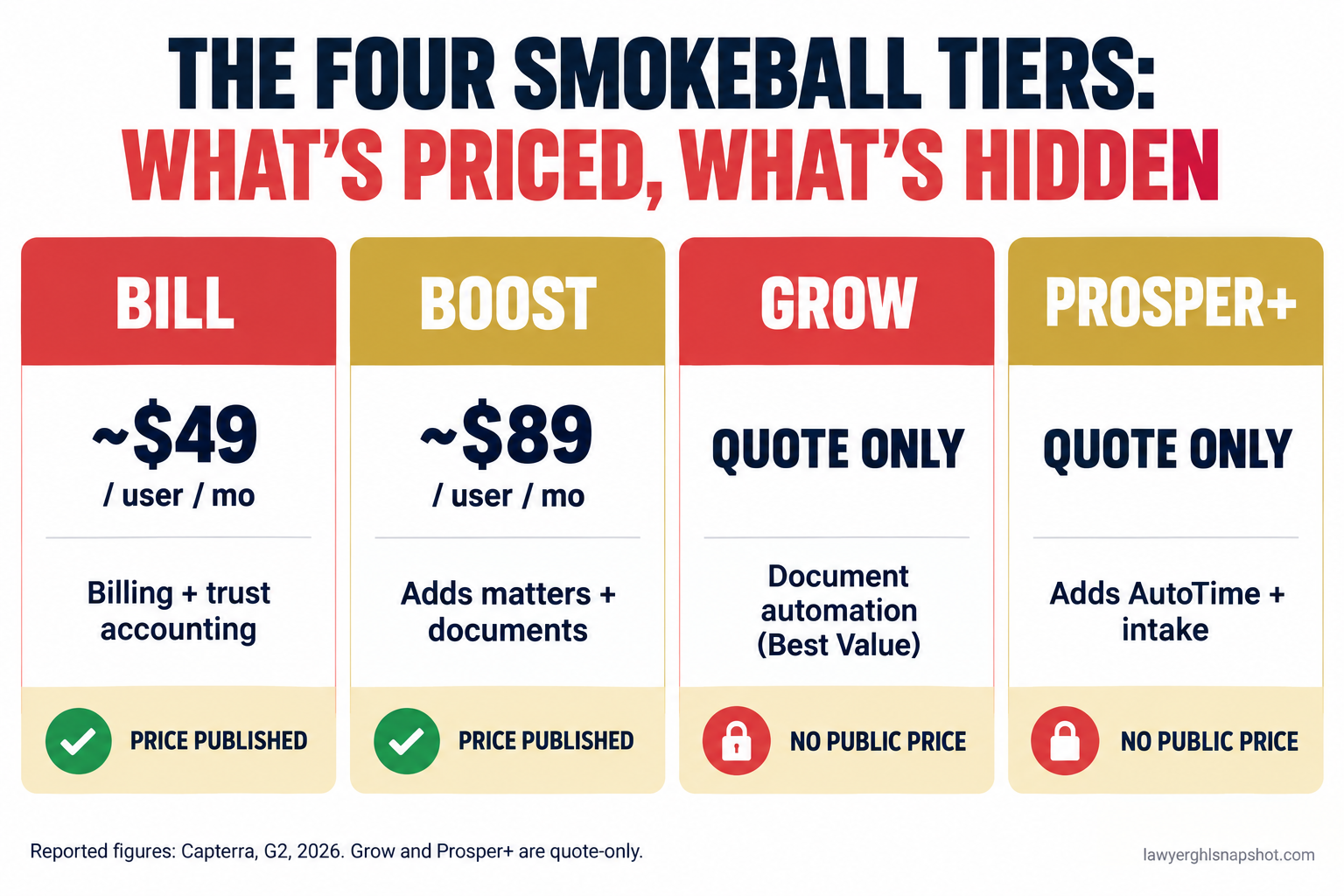
Smokeball sells four plans, and the names tell you the ladder they want you to climb (Smokeball).
Bill is the entry plan, built around billing and trust accounting. It is the cheapest seat, the one third-party sites quote near $49 per user per month: time and billing, not the full case-management experience you saw demoed.
Boost adds matter and document management, so Smokeball starts to feel like a practice-management system. Reported rates sit near $89 per user per month.
Grow carries the “Best Value” badge. It adds document automation and stronger email management, and Smokeball says it is designed for firms with three or more staff who collaborate on matters. Grow is quote-only.
Prosper+ sits at the top. It adds reporting, lead and intake management, and, critically, AutoTime bundled in. Also quote-only.
Notice the pattern. The two tiers you can find a price for are billing and documents. The two that hold the headline features have no price attached. The thing that made you want Smokeball lives above the point where the pricing goes dark.
What does Smokeball actually cost in 2026?
Because Smokeball will not publish a rate, every public number is secondhand. Third-party feeds most consistently report Bill around $49 and Boost around $89 per user per month (Capterra, G2). Grow and Prosper+ carry no reported per-user figure because they are sold by quote. Smokeball’s own marketing gestures at plans “from $149 per month,” and aggregator pages list anywhere from $39 to $179 a seat. That spread is the tell: when a dozen sites each report a different price for one product, none of them were handed a real one either.
The price you can verify tops out around a Boost seat, and the moment you want the features Smokeball markets, you are into quote-only territory next to a tool you could sign up for this afternoon. For the wider view of what every major vendor charges, our legal case management software pricing breakdown is the pillar this sits under.
AutoTime: the feature you are really paying for
Smokeball’s signature feature is AutoTime. It runs in the background and times the work you do inside the platform, Microsoft Word and Outlook, then ties each entry to the right matter so you can edit it before it hits an invoice (Smokeball). For a firm that bleeds billable minutes because nobody writes them down, that is a real fix, and Smokeball claims users increase billable time by 34 percent on average. Treat that as a vendor claim, but the mechanism is sound.
Here is the catch the demo glides past. AutoTime is included in Prosper+ and is an add-on for Grow, not the headline of Bill or Boost, the only tiers you can see a price for. So if AutoTime is why you are looking at Smokeball, you are not shopping the $49 or $89 seat you found online. You are shopping Grow or Prosper+, with no published price, so your budget question waits until a rep decides what your firm pays.
One honest caveat on AutoTime: it only helps if you bill by the hour. If you are a flat-fee or contingency practice, personal injury especially, you bill by the case, so AutoTime captures minutes you will never invoice. Ask whether your firm bills the way it is built to help.
The fees nobody puts in the demo
These are the parts a quote leaves out, where a “reasonable” number turns into a bill that makes your bookkeeper wince.
Implementation and onboarding. Third-party estimates put Smokeball implementation around $500 to $2,000 per user, with training on top, all spent before the software helps a client.
The contract term. Smokeball ties your rate to a 12-month or 36-month commitment, not a monthly tool you can leave in a bad quarter. Ask what happens if you reduce seats mid-term.
Data migration in. Moving existing matters, contacts and documents off an old system is rarely free, and “we support migration” and “we do the migration for you” are different sentences.
Data export out. The one they never volunteer. Ask what it costs to get your data back out and in what format. That answer is your switching cost.
Add-ons and the Windows reality. Smokeball’s richest experience is desktop-first and built tightest around Word and Outlook. If your firm runs on Macs or Google Workspace, confirm what you lose before you assume the demo is the product you get.
What Smokeball costs at three firm sizes
The per-seat model means the tool that feels fair for a solo can be brutal for a growing firm. Here is the annual math on a reported Boost seat (around $89 per user per month), before add-ons.
The solo (2 seats). Roughly $2,100 a year, a rounding error against a solo’s revenue. The catch: a true solo often does not need matter-and-document management at Boost prices, and the AutoTime that justifies Smokeball is a tier or two up.
The 5-attorney firm (8 seats). About $8,500 a year, before the move to Grow or Prosper+ a collaborating team this size is steered toward. This is the firm that gets surprised at renewal, having grown from three seats to eight without re-running the comparison.
The 15-attorney firm (25 seats). At a Boost seat, 25 users is roughly $26,700 a year. Push to the quote-only tiers at the “from $149” framing and you are looking at $44,000 or more before add-ons. Multiply unknown upper-tier pricing by 25 heads and “it depends” becomes a liability.
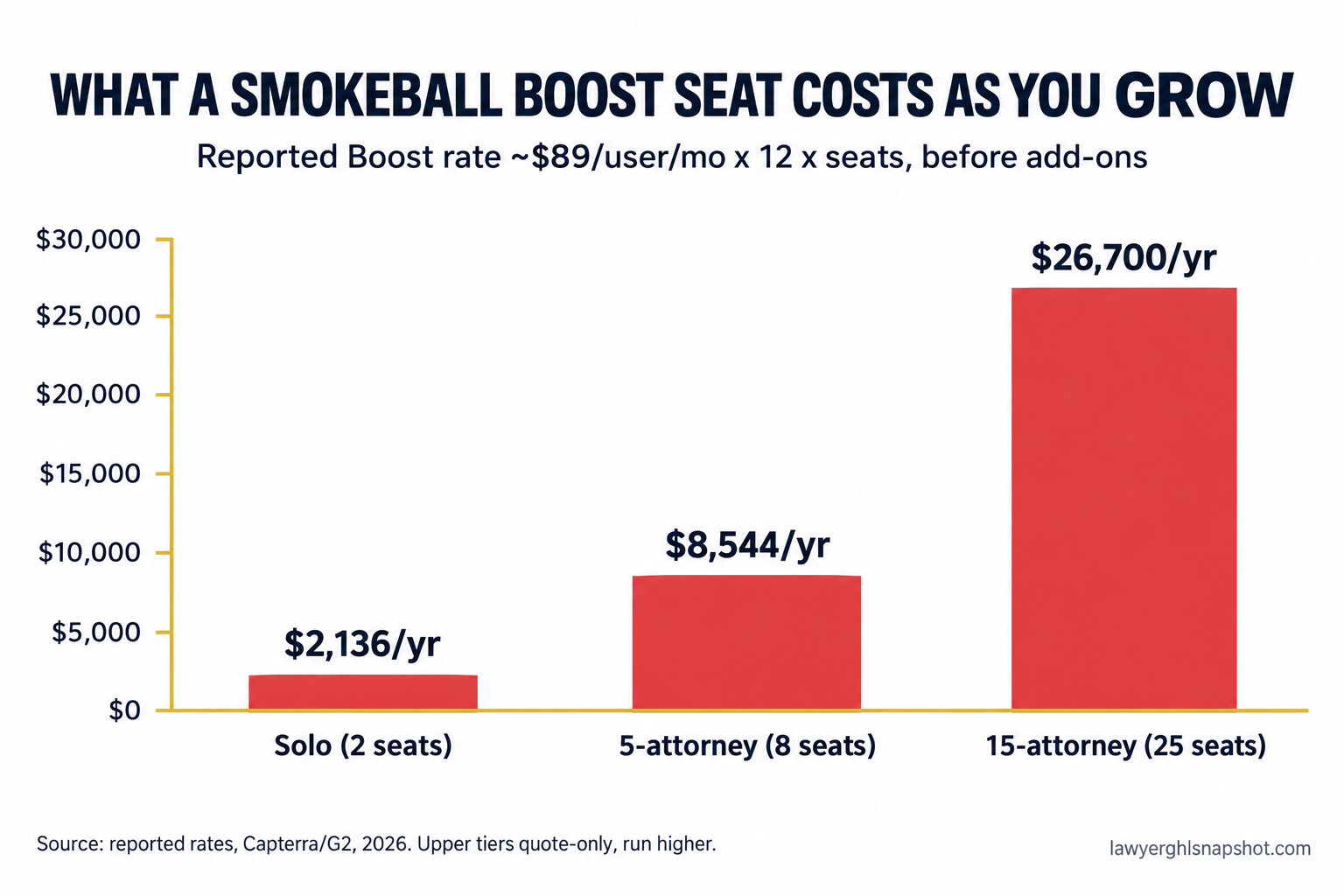
Annual cost at a reported Boost seat (~$89/user/mo) × 12 × seats, before add-ons. Source: reported rates, Capterra and G2, 2026. Grow and Prosper+ are quote-only and run higher.
This is the structural problem with renting your growth by the head: the moment your firm hires, your software vendor gets a raise you never voted for. And a large share of that spend is not the case-management core at all. It is the intake layer, which does not have to be priced per seat.
Is Smokeball worth it, and who is it for?
Smokeball is a good product for a specific firm, and the quote-only pricing exists partly to blur that line.
It is worth it when you are an established, document-heavy, hourly-billing firm on Windows that loses billable time it forgets to record. There, AutoTime plus tight Word and Outlook integration can recover enough hours to cover the seats.
It is a poor fit when you are a solo or a flat-fee, contingency or high-volume practice that does not bill by the hour, you run on Macs or Google Workspace, or your bottleneck is leads you never answered. For transparent alternatives, see our best Clio alternatives for small law firms rundown and the Clio vs MyCase comparison.
Smokeball also will not fix the leak that costs most small firms the most. In Clio’s Legal Trends data, the average lawyer’s utilization rate is 38 percent, about 3.0 billable hours in an 8-hour day, with an 88 percent realization rate and a 93 percent collection rate (Clio, 2025). Automatic time tracking helps you bill hours you already worked. It does nothing for the consultations you never booked, the gap we cover in speed to lead.
3 cheaper ways to get the same result
1. A transparent per-seat tool for the case-management core. If you want matters, billing and trust accounting with a price you can read, Clio publishes seats from $49 to $149 per user (Clio) and PracticePanther publishes a full ladder. You lose automatic time capture but gain a number you can budget. Pair it with disciplined manual timekeeping, which we cover in the true cost of manual time tracking.
2. Keep your current system and fix the real leak. Most small firms do not lose money inside their case-management tool. They lose it before a matter exists, in unanswered calls and no-show consultations. Bolt a flat-fee intake layer onto whatever you already run.
3. Replace the intake-and-follow-up layer with automation. Our GoHighLevel-based system handles 24/7 answering, instant follow-up, reminders, review requests and database reactivation as a one-time install, refined across more than 80 U.S. law firm deployments. It is a flat fee, not a per-user subscription, so it does not get more expensive the year you finally hire. See what is included on the pricing page. Either way, the comparison that matters is total annual cost, not the sticker seat.
Steal this: the email that forces a real quote
To break a quote-only sales process, make a specific written number the price of the rep’s next meeting. Send this before your second call, with the seven questions in the body.
Subject: Numbers before we book the next call
Hi [Rep], thanks for the walkthrough, AutoTime looked strong. Before we book the follow-up, I need written answers to the questions below so I can take a real figure to my partners. A range is fine where it has to be. Send these by email and the next call is a decision, not another discovery session.
The seven questions that unmask the total cost:
- The exact per-user monthly rate for the tier that includes AutoTime (Grow or Prosper+), at my firm’s size band, on a 12-month and a 36-month term.
- The one-time implementation and onboarding fee, and how many training hours are included.
- Is data migration from my current system included or quoted separately, and who does the work?
- What it costs to export all of my data if I leave, and in what format.
- Which demo features require Windows and desktop Microsoft Office, and what I lose on Mac or Google Workspace.
- The renewal increase cap, if any, and what happens to my rate if I reduce seats mid-contract.
- The payment-processing fees on client payments run through the platform.
If a rep will not put those seven numbers in writing, you have your answer about how the relationship goes after you sign.
The compliance angle vendors skip
Marketing and intake tools routinely propose arrangements the bar rules do not allow, and it is your license on the line.
- ABA Model Rule 7.1 bars any false or misleading communication about you or your services (ABA). If a tool’s automated marketing overstates results, that is your license on the line, not the vendor’s.
- Rule 7.2 permits paying for lead generation only when the generator does not recommend, vouch for or select the lawyer. A “we send you signed cases for a cut” pitch tends to cross that line fast.
- Rule 7.3 governs solicitation, and automated outbound to people who never asked to hear from you is where firms get into trouble.
- Non-lawyer fee-sharing is broadly banned, which rules out the revenue-share-on-signed-cases model some marketing vendors love to propose.
One more, because it is where the AI features in these platforms are heading. Any client-facing chatbot has to make clear it is not an attorney and should route or schedule, not answer “what are my chances.” A bot that gives legal predictions risks unauthorized practice of law and blows up privilege. Our law firm texting and AI chatbot compliance guide covers the consent language and the lines you cannot cross.
Common objections
“But AutoTime pays for itself, so the price doesn’t matter.” Only if you bill by the hour and currently lose recorded time. If you are flat-fee or contingency, it captures minutes you will never invoice. Do the math: lost billable hours a week, times your rate, times 50, against the seat cost for everyone who needs it. For plenty of small firms it does not clear.
“I already pay for Clio or MyCase, isn’t switching the point?” Not necessarily. If your case-management core works, the expensive problem is usually the intake and follow-up layer, which you can fix without a second per-seat platform.
“Isn’t quote-only pricing just normal for serious software?” It is common, and still a cost shifted onto you. The firms that get the best deal force written numbers up front.
Frequently asked questions
How much does Smokeball cost per user in 2026?
Smokeball does not publish per-tier prices on its own pricing page. Third-party sites most consistently report Bill around $49 and Boost around $89 per user per month, while Grow and Prosper+ are quote-only. The vendor's own marketing references plans 'from $149 per month.' Confirm any figure directly with Smokeball.
Why doesn't Smokeball show its prices?
Its pricing page lists four plans and no dollar figures, and its FAQ says cost depends on your number of users, plan, contract term and add-ons. Quote-only pricing lets the vendor anchor the price to your firm and bundle everything into one number that is hard to compare against published competitors.
Which Smokeball plan includes AutoTime?
AutoTime, the automatic time tracking, is included in Prosper+ and is an add-on for Grow, not the lower Bill and Boost tiers. Because Grow and Prosper+ are quote-only, the feature most firms shop Smokeball for sits in the tiers with no published price.
Is Smokeball worth it for a small or solo firm?
It can be worth it for an established, document-heavy, hourly-billing firm on Windows and Microsoft Office that loses billable time it forgets to record. For solos, flat-fee or contingency practices, or firms on Mac or Google Workspace, the per-seat and setup cost is harder to justify, especially when the real bottleneck is unbooked consultations rather than unrecorded hours.
What are the hidden costs of Smokeball?
Beyond the per-seat subscription, expect implementation and onboarding (third-party estimates put this around $500 to $2,000 per user), training, data migration in, a 12- or 36-month contract term, payment-processing fees, and a data-export cost if you leave. Get every one in writing before you sign.
What are cheaper alternatives to Smokeball?
For a transparent case-management core, Clio publishes seats from $49 to $149 per user and PracticePanther publishes a full ladder. For the part that grows revenue, intake and follow-up, a flat-fee automation layer handles answering, follow-up, reminders and reactivation for one price, with no per-seat cost as you add staff.
When a rep answers “it depends,” remember it does not depend, they would rather you not compare. Get the seven numbers in writing, run the total-annual-cost math, and decide whether you are buying a tool your firm will use or renting your own growth by the head. For most small firms, the money is not hiding in a better time-tracker. It is leaking out of the phone that rings while you are in court, and that is a far cheaper problem to solve.