It is the last Friday of the month and you are doing the thing you hate. You open the time entries, piece together what happened on each matter, build the invoices, and email them out in one big batch. Then you wait. Some clients pay in a week. Most do not. Three months later you are still sending the same person a fourth “just following up on the attached” email, and you have stopped counting the hours you have spent being your firm’s collections department.
Here is the short answer. The money you are owed is not stuck because your clients are deadbeats. It is stuck because your billing runs on your memory and your spare minutes, and both run out. Firms that bill the moment work is done, make paying a single tap, and let an automated cascade do the chasing collect far faster than firms that send polite nudges by hand. This guide is the six-stage system that gets you there.
Key Takeaways
- Slow billing, not bad clients, is the problem. The average firm collects 93% of what it bills (Clio benchmarks); the gap is mostly a follow-up failure you can automate away.
- Online payment plus automated reminders is the biggest lever. Firms that accept online payments collect 4.5x faster (8am, 2026).
- Payment plans rescue your big bills. On invoices over $5,000, autopay plans recover 79 cents on the dollar versus 38 cents without one (8am, 2026), and a flat-fee platform runs it all without a per-seat legal CRM.
- Automating billing does not suspend the trust rules. Processing fees can never come out of your IOLTA account, and surcharges are restricted in several states.
Table of contents
- Why your firm gets paid late
- What slow collections actually cost you
- The 6-stage billing follow-up system
- The same system for a solo, a 5-attorney, and a 15-attorney firm
- The trust and compliance rules you cannot skip
- Common objections
- Frequently asked questions
Why your firm gets paid late
Lawyers tend to blame slow pay on clients. The data says look closer to home. The average law firm collects 93% of what it invoices and bills only 88% of the work it actually does, per Clio’s Legal Trends benchmarks. A real chunk of what you perform never turns into money, and most of that leak is not fraud. It is friction.
Think about the path a bill travels at a typical firm. The work happens on a Tuesday. The invoice gets built three weeks later in a month-end batch. It lands as a PDF the client has to open, find a checkbook for, write a check, buy a stamp, and mail. Every step is a place the payment stalls. Then the only follow-up is you, remembering on a slow afternoon and softening the reminder so much the client feels no urgency. Compare that to a firm that bills the day the matter wraps, sends a link the client taps from their phone, and lets software send reminders on a fixed schedule. 8am’s 2026 data found firms that accept online payments collect 4.5x faster than those that do not. The clients did not change. The friction did.
What slow collections actually cost you
The cost never arrives as one scary number. It shows up as a slow bleed in three places.
First, the write-offs. That 7% of billed work the average firm never collects clusters in the oldest invoices, because the older a bill gets, the less likely it is to ever be paid. 8am’s data pegs the median overdue bill at 131 days past due and the average overdue balance at $3,400, up 21% from early 2024. A bill four months old is a collections problem, and those get written off.
Second, your cash flow. A firm waiting 60 to 90 days to collect floats payroll, rent, and its own marketing out of pocket the whole time. That is the money that should be funding your intake and follow-up systems, sitting in someone else’s bank account.
Third, your own hours. Every reminder email you write by hand is a non-billable minute, the same leak that makes manual time tracking so expensive: work that pays gets crowded out by admin that does not. A lawyer is the most overpaid collections clerk in the building. There is a relationship cost too: a tense, late money conversation after a good result sours a happy client in a way a steady automated reminder never does.
Cents recovered per dollar billed on invoices over $5,000, with and without an autopay payment plan. Source: 8am 2026 small-firm billing data.
The 6-stage billing follow-up system
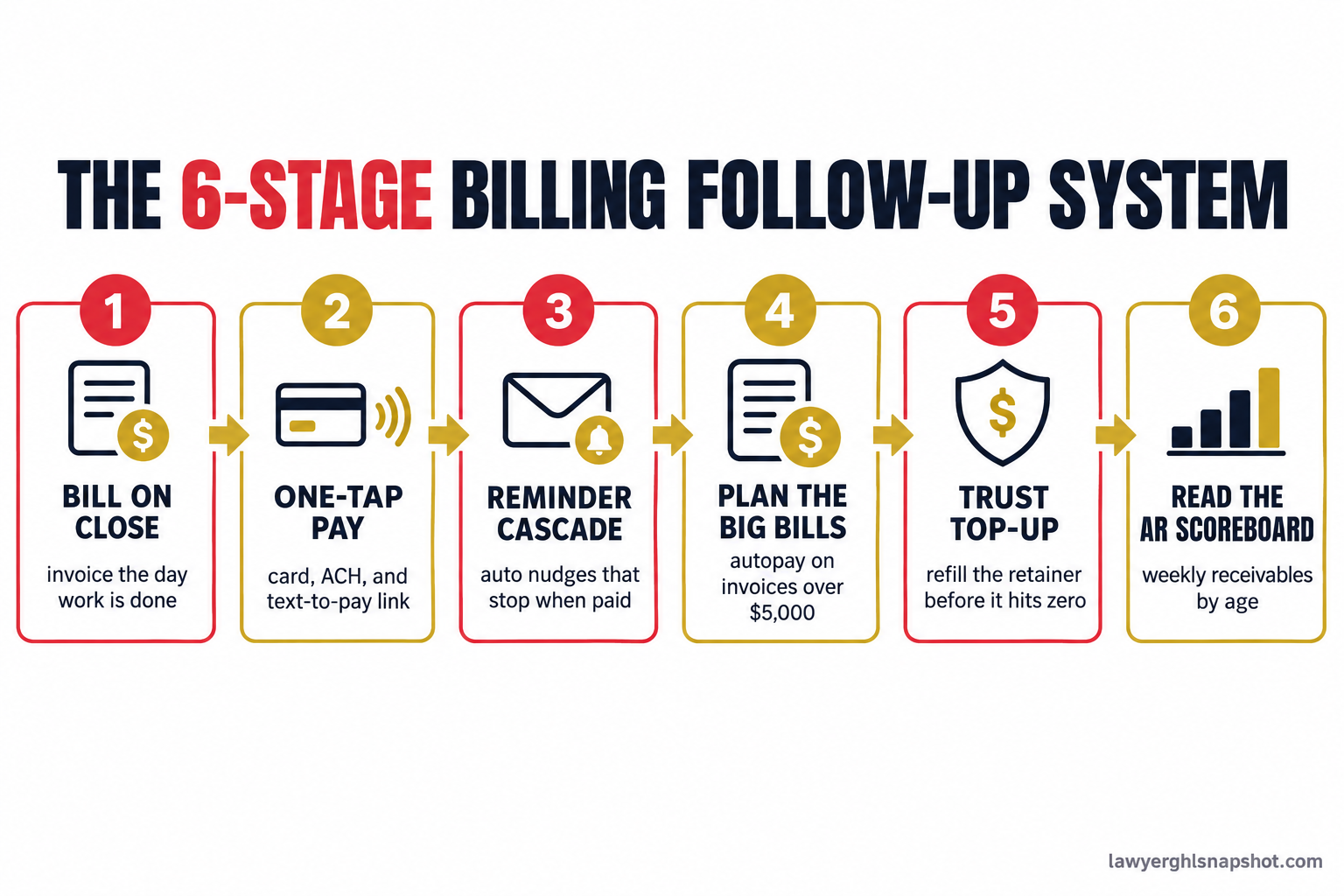
You need a repeatable path from “work done” to “money in the bank” that runs without you. Here are the six stages, each with the setup, the copy, and the way it breaks.
Stage 1: Bill the day the work is done, not at month-end
The highest-impact change is timing. Stop batching. The closer the invoice sits to the work, the fresher it is in the client’s mind and the faster it gets paid. Set your system so that when a matter closes or a billing milestone hits, the invoice generates and goes out that day. For flat-fee and contingency matters, trigger the bill off the event itself: case resolved, document filed, closing completed.
The failure mode is the comfort of the batch. Month-end billing feels efficient, but it builds a three-week delay into every invoice. Make billing a byproduct of closing work, not a chore you schedule.
Stage 2: Make paying a single tap
A client who has to find a checkbook pays in two weeks. A client who taps a button pays the same afternoon. Clio’s data shows 57% of electronic bills get paid the same day they are sent and 85% within a week. Put a real payment link in every invoice and reminder, accept card and bank transfer (ACH), and turn on text-to-pay so the client can pay from their phone.
The failure mode is making people hunt for how to pay. The link should be the most obvious thing in the message and land the client on a page that already knows which invoice they are paying, not a line of small print reading “remit to the address above.”
Stage 3: Run the reminder cascade on autopilot
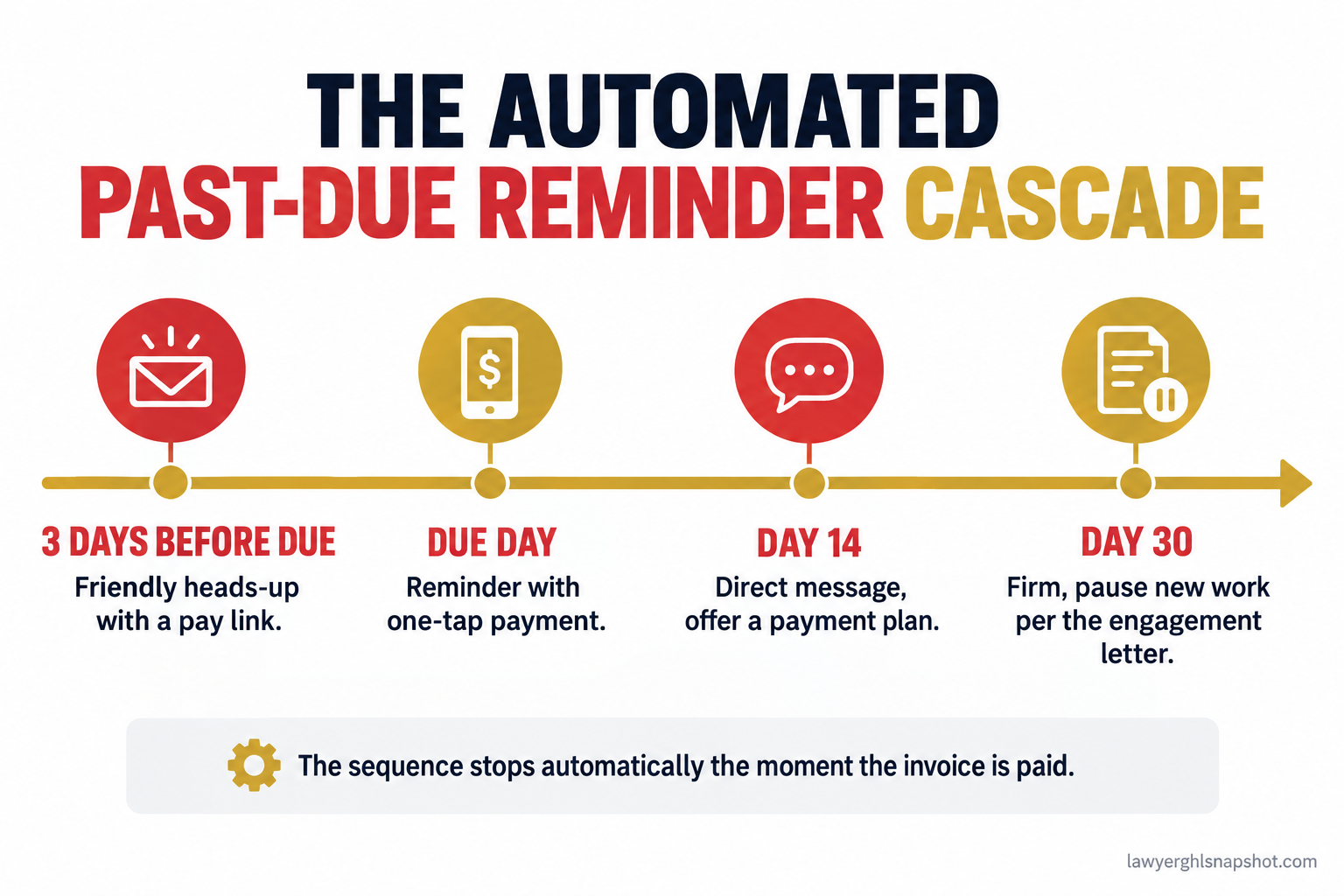
This is the stage that does the actual chasing, and the one you should never do by hand again. Build a fixed sequence that fires off the invoice date and stops the instant the bill is paid: a friendly heads-up three days before the due date, a due-day reminder, then follow-ups at 7, 14, and 30 days past due, each firmer. The system marks the invoice paid the moment payment clears, so nobody gets a dunning notice for a bill they already settled.
The failure mode is twofold: reminders that never stop after payment, which annoys good clients, and a tone that never escalates, so the 30-day message carries no weight. Automation fixes both, and lets you write the escalation in advance.
Stage 4: Offer a plan on the big bills
Large invoices are where collections go to die, and also where a payment plan pays off most. 8am’s 2026 data found that on bills over $5,000, firms recover 79 cents on the dollar with an autopay plan versus 38 cents without one. For any invoice above a threshold you set, offer a structured plan up front instead of waiting for the client to default on a lump sum.
Automate the plan so it collects itself: the client saves a card on file, and the system charges each installment and emails a receipt. The failure mode is running plans on a sticky note and forgetting the March installment. If the installments are not on autopay, you have not built a plan. You have built another thing to chase. The offer is simple: “If paying [$amount] in one go is not ideal, we can split it into [N] monthly payments on autopay. Reply yes and I will send the agreement and a secure link to save your card.”
Stage 5: Trigger the trust top-up before you run dry
If you bill against a retainer held in trust, the billing system should watch that balance and act before it hits zero. Set a floor. When earned fees draw the balance below it, the system sends the client a replenishment request with a payment link, so you are never working with no funds behind you. This is the retainer replenishment loop that stops you working for free, and it belongs inside your automation, not in your head.
The failure mode is discovering a depleted retainer only when you go to pay yourself, after the unfunded work is done. The fix is a balance trigger on a threshold, with the same reminder cascade behind it if the first request goes unanswered.
Stage 6: Read the AR scoreboard every week
The last stage turns all of this into a number you can act on. Every week, look at one report: accounts receivable by age. How much is current, how much is 30, 60, 90 days out, and on which matters. You are not doing the chasing anymore, so this is a five-minute glance. It tells you which clients need a personal call instead of another automated nudge, and a 90-day bucket that shrinks month over month tells you the machine is working.
The failure mode is never looking, because “the software handles it.” Automation does the repetitive work. It does not make the judgment call about the one client who needs you to pick up the phone. That call is still yours.
The same system for a solo, a 5-attorney, and a 15-attorney firm
The six stages are the same at every size. What changes is who runs them and how much the manual version is quietly costing you.
Solo practice. You are the lawyer, the biller, and the collections department, so billing is the first thing that slips when you get busy. Automation matters most here because you have the least slack. Start narrow with day-of invoicing and one-tap links, then add the reminder cascade so the chasing stops eating your evenings. Skip the $100-per-seat legal CRM; a flat-fee platform does reminders and text-to-pay without a bill that assumes you have a team.
5-attorney firm. Now a bookkeeper or office manager touches billing, and the problem shifts from “nobody does it” to “everybody does it differently.” Standardize the trigger (bill on matter close or milestone) and the cascade so every matter follows the same path regardless of which lawyer owns it. Your office manager stops being a human reminder engine and starts watching the AR scoreboard.
15-attorney firm. Here inconsistency is expensive and invisible: one attorney who sits on billing can tie up tens of thousands in unbilled work until quarter-end. The automation becomes a control system, with firm-wide triggers, autopay plans on every large matter, and a weekly AR report by attorney so the managing partner sees exactly whose book is leaking. The per-seat math turns decisive too, since a tool that charges per user punishes you for growing. A flat-fee custom GoHighLevel build keeps cost flat while headcount climbs.
The trust and compliance rules you cannot skip
Automating billing does not change your ethical duties. It makes them easier to follow, or, set up carelessly, easier to break at scale.
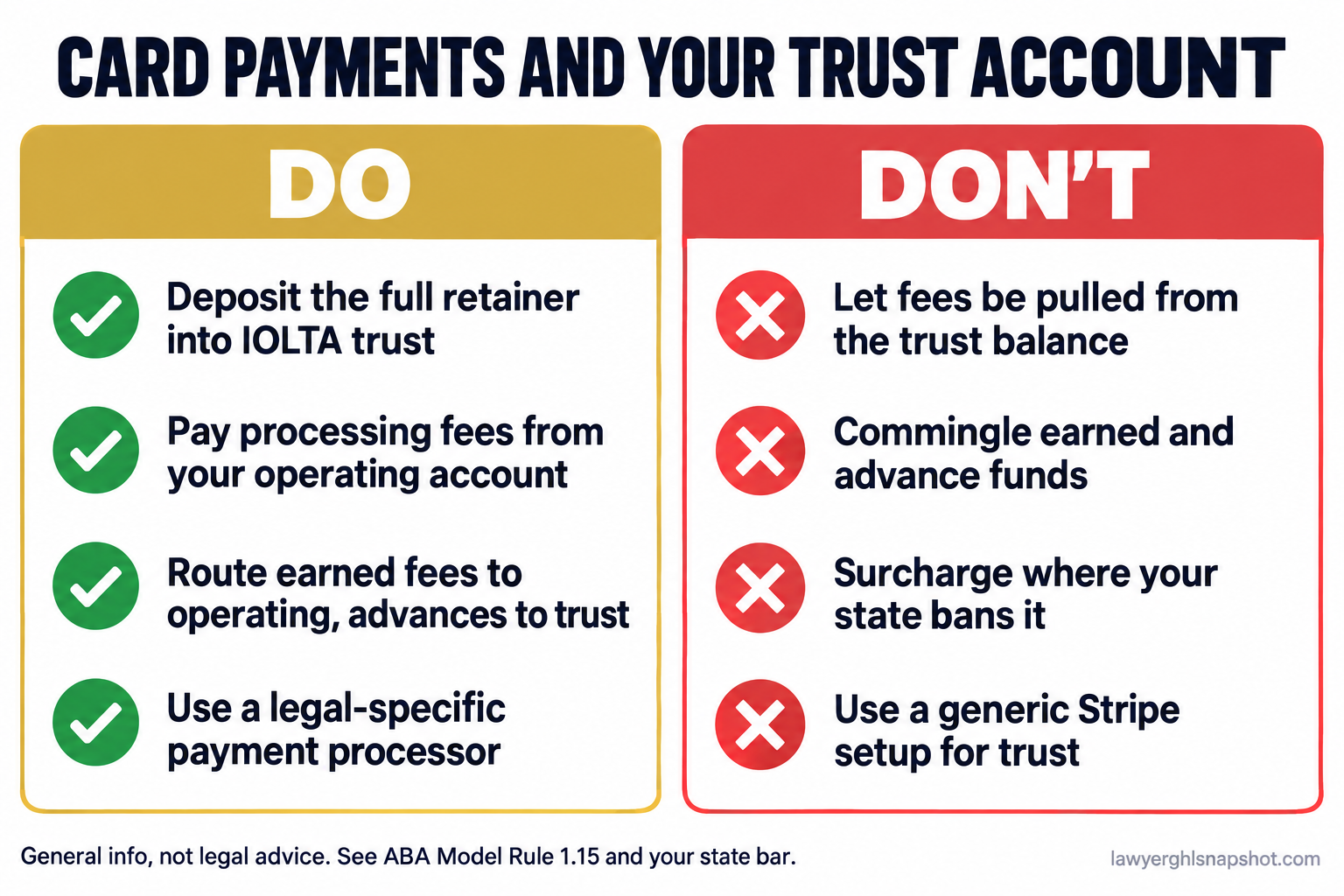
Processing fees never come out of trust. Under ABA Model Rule 1.15 and every state equivalent, client funds in your IOLTA account must stay whole. When a client pays a retainer by card into trust, the full amount lands in trust and the processing fee comes out of operating, never the trust balance. A processor that pulls its fee from the trust deposit creates a shortfall in client funds, which is exactly what gets a firm disciplined over its trust accounting. Legal-specific processors do this correctly; a generic Stripe setup usually does not.
Earned fees and advance deposits go to different accounts. Earned money goes to operating; money paid in advance goes to trust until you earn it. Your automation has to route each payment to the right one, or you are commingling.
Surcharges are a state-by-state question. Passing your card fee on to the client as a surcharge is restricted or banned in roughly a dozen states, and where it is allowed you generally cannot charge more than your actual cost. Check your state’s law and bar ethics opinions first, or absorb the fee.
Reminder texts still need consent. Billing reminders to a current client about their own matter are transactional, but you still want documented consent to text them, the same A2P 10DLC and consent hygiene you use everywhere else. Capture the opt-in at intake.
Common objections
“Won’t automated reminders annoy my clients?” The opposite, when done right. A consistent, friendly reminder with a one-tap link reads as service, not nagging. What annoys clients is a surprise past-due call three months later, or a dunning notice for a bill they already paid. Automation keeps reminders calm and kills them the instant payment lands.
“I already pay for Clio (or MyCase). Doesn’t it do this?” They have billing modules, and if yours is set up with automated reminders and online payments, use them. The catch is cost and scope: per-seat tools bill you more every time you add a person. The system here is the same machine that runs your intake and client communication, on a flat fee, so billing, reminders, and lead follow-up live in one place.
“Do I need to be technical to run this?” No. It is a one-time configuration, and the done-for-you version installs the whole thing for you. After that it runs itself.
“My clients are old-school and pay by check.” A one-tap link does not remove the check option. It just stops the clients who would happily pay online, which is most of them, from defaulting to the slowest method because it was the only one offered.
Frequently asked questions
What is law firm billing automation?
It is a system that invoices the day work is completed, sends a one-tap online payment link, runs reminders that stop the moment the bill is paid, charges payment-plan installments on autopay, and tops up depleted trust retainers automatically. It removes the lawyer from the manual chasing loop, and firms that accept online payments collect 4.5x faster than those that do not (8am, 2026).
How much faster do firms get paid with online payments?
A lot faster. 8am's 2026 data found firms accepting online payments collect 4.5x faster than those without, and Clio reports 57% of electronic bills are paid the same day they are sent and 85% within a week (Clio).
Do payment plans actually improve collections?
Yes, especially on large bills. On invoices over $5,000, firms recover 79 cents on the dollar with an autopay plan versus 38 cents without one (8am, 2026). An auto-charged plan turns a bill the client would have defaulted on into one that collects itself.
Can I take processing fees out of my trust account?
No. Under ABA Model Rule 1.15 and its state equivalents, client funds in IOLTA must stay whole. When a retainer is paid by card into trust, the full amount goes to trust and the fee comes out of your operating account. Use a legal-specific processor built to split payments that way. This is not legal advice; confirm with your state bar.
Can I add a surcharge for clients who pay by credit card?
It depends on your state. Surcharging is restricted or prohibited in roughly a dozen states, and where it is allowed you generally cannot charge more than your actual processing cost. Check your state's surcharge law and bar ethics opinions first, or absorb the fee to stay safe.
The Friday that stops being about collections
Go back to that last Friday of the month. In the automated version there is no billing batch, because the invoices went out the day each matter closed. There are no reminder emails to write, because the cascade already sent them and already stopped for everyone who paid. There is no retainer surprise, because the trust threshold caught it two weeks ago. What is left is a five-minute look at the AR scoreboard and maybe one call to the client who genuinely needs you.
That is the whole point. Billing automation gets you paid faster, and it takes the job you are worst suited for, chasing your own money, off your desk, so the hours you spend are the ones you can bill. The collection rate climbs because the friction is gone, and the Friday goes back to being yours.