It is a Thursday afternoon and you are 40 minutes into a Lawmatics demo. The rep has shown you a lead moving on its own from a web form, into a nurture sequence, out to a booked consultation, and it looks sharp. Then you ask the only question a firm owner came for, what does this cost my practice per year, and the answer is a warm smile: “Let’s build you a custom quote.” You came for a number. You leave with a calendar invite for a second call. That is the pricing model working exactly as designed.
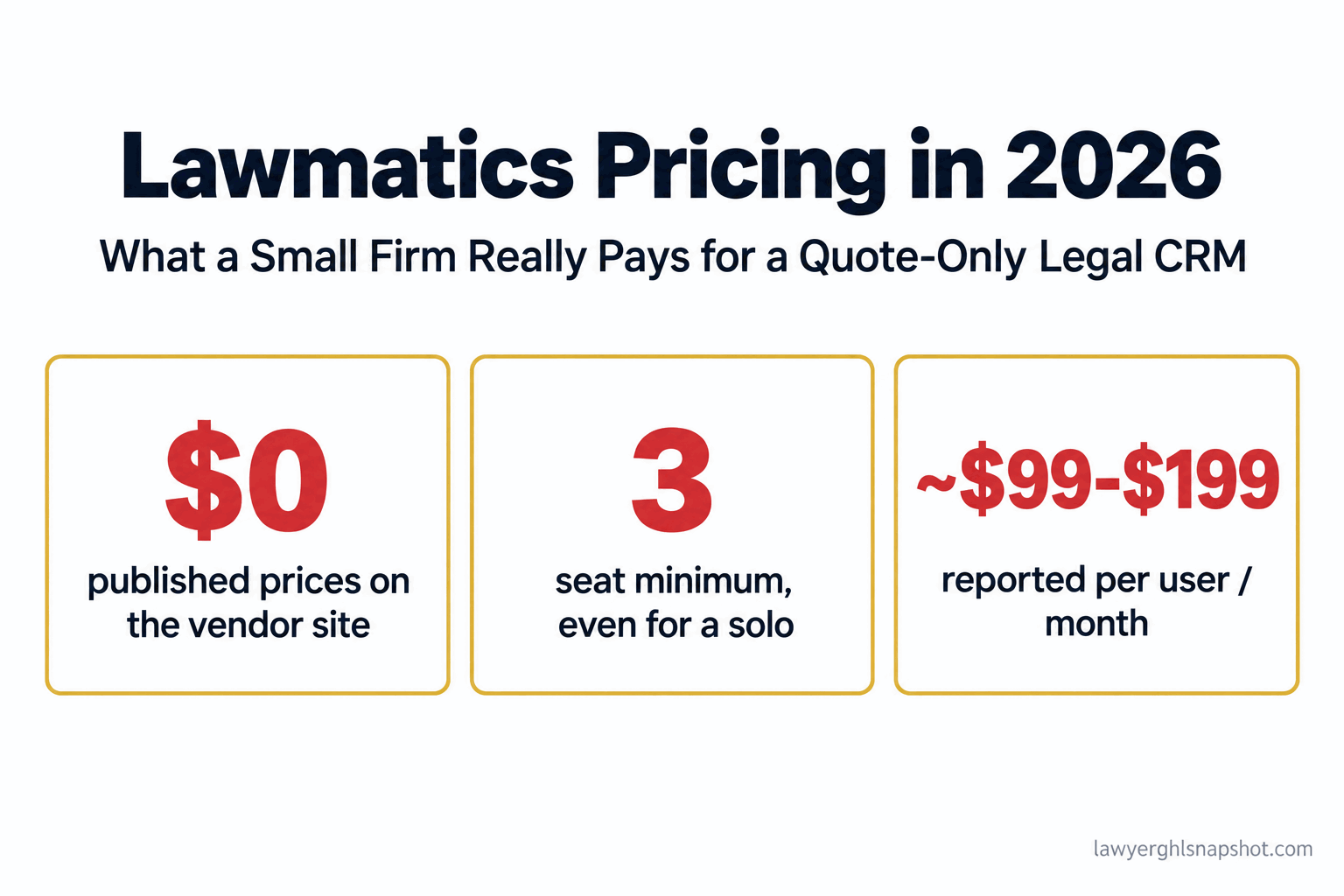
Here is the short version. Lawmatics does not publish a price. Its pricing page lists three plans, Essential, Premium and Enterprise, with feature columns and not one dollar figure (Lawmatics). It also sets a three-user minimum on both Essential and Premium, so a true solo pays for three seats on day one. Third-party sites report rates clustering around $99 to $199 per user per month, which puts the smallest real subscription near $300 to $600 a month before a single add-on. For a high-volume intake firm it can earn its keep. For a lean or solo practice, the math gets hard fast.
Key Takeaways
- Lawmatics publishes no prices. Its pricing page shows three plans, Essential, Premium and Enterprise, and zero dollar figures; every card routes to “Get a demo” (Lawmatics).
- The 3-seat minimum is the catch. Essential and Premium both require three users, so a solo pays for three seats whether or not anyone else logs in (Lawmatics).
- Reported rates: aggregators put Lawmatics around $99 to $199 per user per month, some listing a top tier near $299 (G2, Capterra). None is a confirmed vendor rate.
- The AI costs extra, and vaguely. Merlin Qualify and Engage are priced “outcome-based,” Copilot is “user-based,” and Time & Billing is a separate add-on (Lawmatics). Reviewers report an onboarding fee and an annual contract on top.
- Cheaper paths exist. Clio still publishes an entry seat near $49 per user (Clio), and a flat-fee automation layer covers intake and follow-up with no per-seat tax and no three-seat floor.
Table of contents
- Why won’t Lawmatics just show you the price?
- The three Lawmatics plans, and what each really includes
- What does Lawmatics actually cost in 2026?
- The 3-seat minimum: the line that hits solos hardest
- The fees nobody puts in the demo
- What Lawmatics costs at three firm sizes
- Is Lawmatics worth it, and who is it for?
- 3 cheaper ways to get the same result
- Steal this: the email that forces a real quote
- The compliance angle vendors skip
- Common objections
- Frequently asked questions
Why won’t Lawmatics just show you the price?
Open a pricing page and you expect numbers. Open Lawmatics’ and you get three plan cards, a “MOST POPULAR” badge on Premium, feature checklists, and buttons that say “Get a demo” and “Contact Sales.” The page asks you to “help us get to know you better for a custom quote” (Lawmatics). There is no rate anywhere on it.
Quote-only pricing is not an accident. It anchors the price to what your practice looks able to pay, bundles software, AI add-ons and a multi-year contract into one number, and strips away the one thing you need to negotiate: something to compare against. You cannot budget for a figure you cannot see, and you have nothing to point at when the renewal climbs.
Lawmatics is not alone, and the trend is getting worse. Clio, long the transparent option here, now publishes a price for only its entry EasyStart seat and routes the rest through a “Get Pricing” form (Clio). When the most buyer-friendly vendor in the category hides its upper tiers, “request a quote” becomes the default. Your job is to refuse to play it blind.
The three Lawmatics plans, and what each really includes
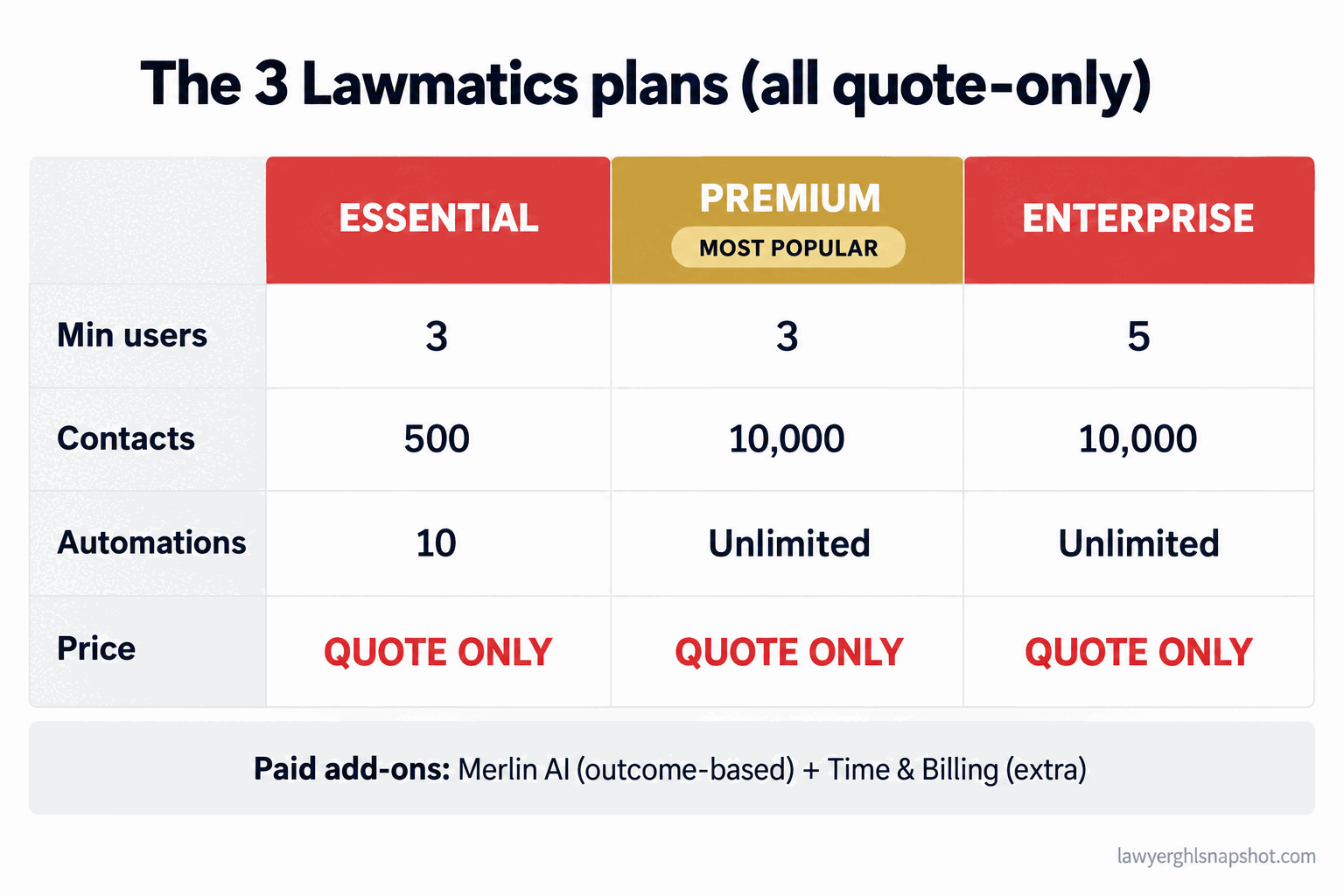
Lawmatics sells three plans, and the feature ladder tells you where they want you to land (Lawmatics).
Essential is the entry tier: a three-user minimum, contacts capped at 500, 10 automations, and 50 two-way SMS a month. That contact cap matters more than it looks. A legal CRM’s whole point is working your database, and 500 contacts is a number a working firm blows past fast. Extra contacts are sold separately.
Premium wears the “MOST POPULAR” badge, the tier the demo quietly steers you toward. It also requires three users minimum, raises the contact cap to 10,000, unlocks unlimited automations and audiences, lifts two-way SMS to 100 a month, and includes up to 50,000 email sends. This is the plan that behaves like the product you saw demoed.
Enterprise sits on top with a five-user minimum and the same 10,000 contacts. Like the others, it is quote-only.
Then there are the add-ons, where the real bill forms. The Merlin AI tools and the Time & Billing module are all separate line items, priced out below. The lead-qualifying AI that made the demo feel magic, and the billing you probably assumed was included, are both extra (Lawmatics).
What does Lawmatics actually cost in 2026?
Because Lawmatics will not publish a rate, every public number is secondhand, and they disagree. Third-party aggregators most often put Lawmatics in the $99 to $199 per user per month band, with some listing a top tier near $299 (G2, Capterra). Some sites quote flat plan prices, others per-seat, which is itself a tell: when a dozen sites report a different model for one product, none was handed a real price sheet either. The one thing you can trust is the structure: three plans, a three-seat floor, and paid add-ons for the AI and billing.
The cheapest reported Lawmatics seat still sits at roughly twice a published Clio entry seat, and that is before Lawmatics makes you buy at least three. For the wider view of what every major vendor charges, our legal case management software pricing breakdown is the pillar this teardown sits under.
The 3-seat minimum: the line that hits solos hardest
This is the detail that changes the whole calculation for a small firm. Both Essential and Premium require three users (Lawmatics). A solo with a paralegal is a two-person shop paying for three seats. A true solo is one person paying for three.
Run it at the reported midpoint. Three forced $149 seats is about $447 a month, roughly $5,364 a year, for software one person logs into. Even at the $99 floor you pay about $3,564 a year for seats you do not need. The product may be excellent, but you cannot buy the amount of it your firm actually uses. That is the structural problem with a seat floor: it prices out exactly the solo and two-person firms who feel the intake pain most.
The fees nobody puts in the demo
These are the parts a quote leaves out, where a “reasonable per seat” number turns into a bill that makes your bookkeeper wince.
The onboarding fee. Reviewers report a setup charge on top of the subscription, commonly cited around $399, spent before the software books a single consultation. It is rarely volunteered up front.
The annual contract. Multiple reports describe Lawmatics as an annual commitment, not a monthly tool you can leave in a slow quarter. Ask the term, the renewal increase, and what happens if you cut seats mid-contract.
The AI add-ons. Merlin Qualify and Engage are “outcome-based,” Copilot is “user-based” (Lawmatics). Get “outcome-based” defined in dollars before you rely on it, because the whole point of the AI is that it runs constantly.
Time & Billing as an add-on. If you expected billing baked in, it is a separate module. Price it before you assume it is included.
Contact overage and export. Essential’s 500-contact cap means database growth is a cost driver: the better your marketing works, the more you hold, the more you owe. And ask what it costs to get your data back out if you leave. That is your real switching cost.
What Lawmatics costs at three firm sizes
Here is the annual math at the reported midpoint of about $149 per user per month, before onboarding and add-ons. Treat these as estimates, widened or narrowed by the $99 to $199 reported band.
The solo (3-seat floor). Roughly $5,364 a year at $149 a seat, about $3,564 at the $99 floor. Either way, three seats to run a one-desk practice.
The 5-attorney firm (8 seats). About $14,300 a year at the midpoint, before the AI add-ons a marketing-focused firm this size will turn on. This is the firm that signs at three seats, then quietly doubles the bill as it staffs up.
The 15-attorney firm (25 seats). At $149 a seat, 25 users is roughly $44,700 a year, and the high reported end pushes toward $60,000 before Merlin AI and Time & Billing. Multiply an unconfirmed rate by 25 heads and “let’s build a custom quote” becomes a commitment you negotiated half-blind.
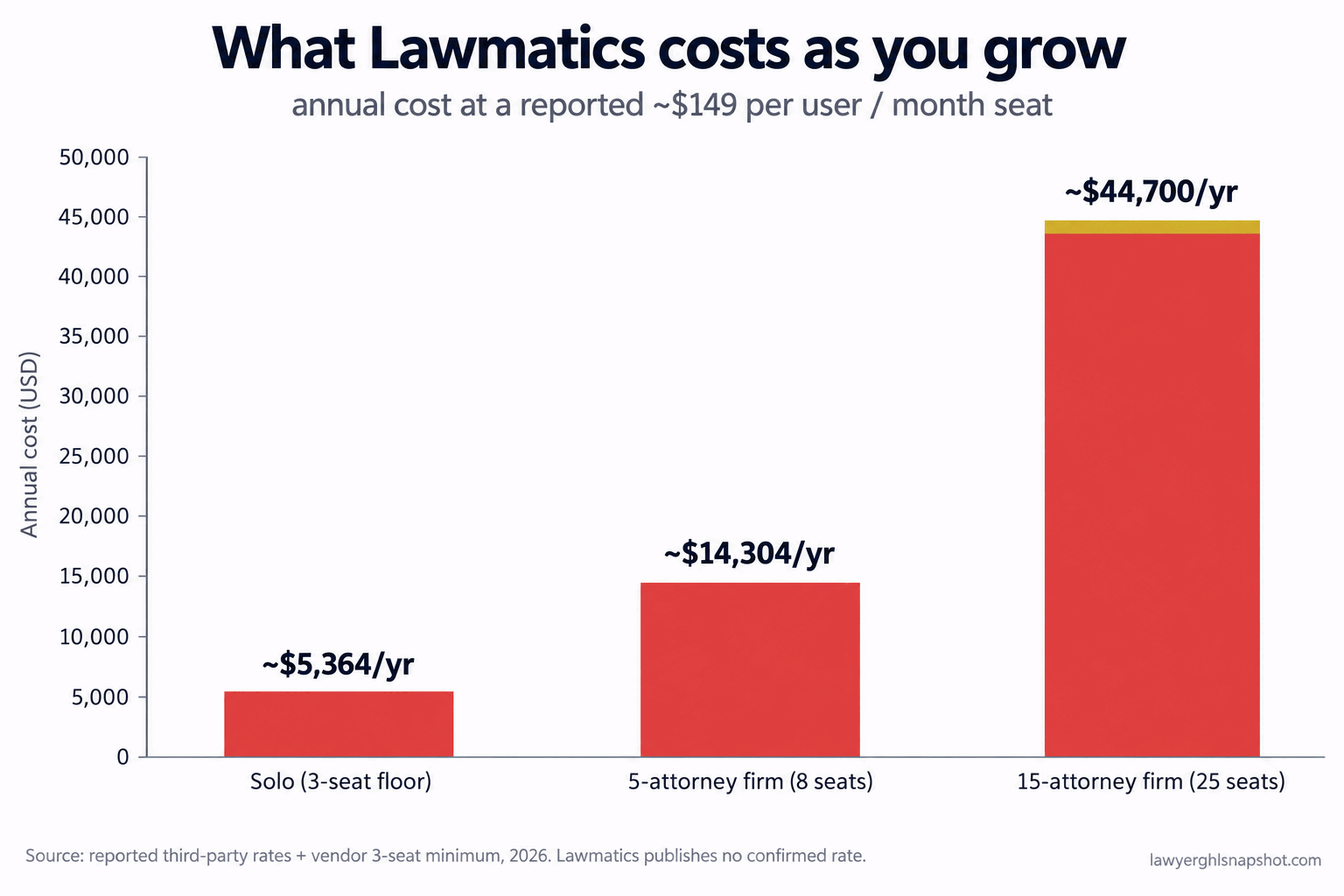
Annual cost at a reported midpoint seat (about $149/user/mo) times 12 times seats, before onboarding and add-ons. Source: reported third-party rates (G2, Capterra), 2026, and the vendor’s 3-seat minimum (Lawmatics).
Most of what Lawmatics sells a small firm is the intake-and-marketing layer: forms, follow-up, booking, reminders, review requests, reactivation. That is the part that fills your calendar, and it does not have to be priced per seat.
Disclosure: the GoHighLevel link above is an affiliate link. If you sign up through it we may earn a commission, at no extra cost to you.
Is Lawmatics worth it, and who is it for?
Lawmatics is a strong product for a specific firm, and the quote-only pricing partly exists to blur where that line sits.
It is worth it when you are a marketing-heavy, high-volume intake practice with real lead volume, three or more staff who will all use it, and a budget that treats the CRM as a growth engine. There, the automation and Merlin AI qualifying can pay for themselves.
It is a poor fit when you are a solo or two-person shop forced to buy three seats, a referral-driven practice without high lead volume, or a firm whose real bottleneck is answering the phone fast. For transparent alternatives, see our best Clio alternatives for small law firms rundown and the Clio vs MyCase comparison.
And remember what a CRM cannot fix. In Clio’s Legal Trends data, the average lawyer’s utilization rate is 38 percent, about 3.0 billable hours in an 8-hour day, with an 88 percent realization rate (Clio, 2025). A pricier CRM does not move those numbers. What moves them is answering the leads you miss and billing the hours you already work, the problem we cover in speed to lead.
3 cheaper ways to get the same result
1. A transparent CRM seat for the pipeline core. If you want a legal CRM with a price you can read, Clio still publishes an entry seat near $49 per user (Clio) with no three-seat floor, so a solo pays for one seat. Just confirm the upper-tier quote before you assume the cheap seat does everything, because Clio now gates those tiers too.
2. Keep your current system and fix the real leak. Plenty of firms do not lose money inside the CRM. They lose it before a contact exists, in unanswered calls and no-show consultations. Bolt a flat-fee intake-and-follow-up layer onto whatever you run. Our client intake system for a solo law firm guide walks the setup.
3. Replace the intake-and-marketing layer with flat-fee automation. Our GoHighLevel-based system handles 24/7 answering, instant follow-up, reminders, review requests and reactivation as a one-time install, refined across more than 80 U.S. law firm deployments. Flat fee, no per-user charge, no three-seat minimum. See what is included on the pricing page. The comparison that matters is total annual cost, not the per-seat sticker.
Steal this: the email that forces a real quote
To break a quote-only sales process, make a specific written number the price of the rep’s next meeting. Send this before your second call.
Subject: Numbers before we book the next call
Hi [Rep], thanks for the walkthrough, the automation looked strong. Before we book the follow-up, I need written answers to the questions below so I can take a real figure to my partners. A range is fine where it has to be. Send these by email and the next call is a decision, not another discovery session.
The seven questions that unmask the total cost:
- The per-user monthly rate for Essential and Premium at my firm’s size, on monthly and annual terms, with the three-seat minimum confirmed in writing.
- The one-time onboarding fee, and how many implementation and training hours are included.
- Full pricing for the Merlin AI add-ons (Qualify, Engage, Copilot). What does “outcome-based” mean in dollars at my lead volume?
- The cost of Time & Billing, and whether anything I saw demoed lives behind it or another add-on.
- The contact cap on my plan, and the overage cost per additional block of contacts.
- The contract term, the renewal increase cap, and what happens if I reduce seats mid-term.
- What it costs to export all my data if I leave, and in what format.
If a rep will not put those seven numbers in writing, you already know how the relationship goes after you sign.
The compliance angle vendors skip
Marketing and intake tools routinely propose arrangements the bar rules do not allow, and it is your license on the line, not the vendor’s.
- ABA Model Rule 7.1 bars any false or misleading communication about your services (ABA). If an automated nurture sequence overstates results or implies a guarantee, that is on you.
- Rule 7.2 permits paying for lead generation only when the generator does not recommend, vouch for or select the lawyer. A “we send you signed cases for a cut” pitch tends to cross that line fast.
- Rule 7.3 governs solicitation, and automated outbound to people who never asked to hear from you is a common way firms get into trouble.
- Non-lawyer fee-sharing is broadly banned, which rules out the revenue-share-on-signed-cases model some marketing vendors love to propose.
One more, because it is where the AI in these platforms is heading. Any client-facing chatbot must make clear it is not an attorney and should route or schedule, not answer “what are my chances.” A bot that gives legal predictions risks unauthorized practice of law and can blow up privilege. Our law firm texting and AI chatbot compliance guide covers the consent language before you turn any AI qualifier loose on real prospects.
Common objections
“The automation pays for itself, so the price doesn’t matter.” Only if you have the lead volume to feed it and the staff to use three seats. A solo paying for three seats to automate a one-desk practice is subsidizing capacity that books no consultations. Do the math on booked consults against the full annual cost, add-ons included, first.
“I already run Clio or MyCase, isn’t a dedicated CRM the upgrade?” Not necessarily. If your case-management core works, the expensive gap is usually the intake and follow-up layer, which you can fix without stacking a second per-seat platform on top. See the true cost of manual time tracking for how these layers overlap.
“Isn’t quote-only pricing just normal for serious software?” It is common, and still a cost shifted onto you. The firms that get the best deal force written numbers up front.
Frequently asked questions
How much does Lawmatics cost per user in 2026?
Lawmatics does not publish per-tier prices; every plan card routes to a demo. Third-party review sites most often report $99 to $199 per user per month, some listing a top tier near $299. Because both main plans carry a three-user minimum, the smallest real subscription usually starts around $300 to $600 a month before add-ons. Confirm any figure directly with Lawmatics.
Why doesn't Lawmatics show its prices?
Its pricing page lists three plans with feature columns and no dollar figures, and asks you to request a custom quote. Quote-only pricing lets the vendor anchor the price to your firm's apparent budget and bundle software, AI add-ons and a multi-year contract into one number that is hard to compare against published competitors.
Does Lawmatics really have a 3-user minimum?
Yes. Per the vendor's own pricing page, Essential and Premium both require three users, and Enterprise requires five. A solo pays for three seats even if only one person logs in, which is the biggest cost surprise for small firms.
What are the hidden costs of Lawmatics?
Beyond the per-seat subscription and three-seat minimum, expect an onboarding fee (reviewers cite around $399), an annual contract, separately priced Merlin AI add-ons, a Time & Billing add-on, contact-cap overage charges, and a data-export cost if you leave. Get every one in writing before you sign.
What are cheaper alternatives to Lawmatics?
For a transparent CRM seat with no three-user floor, Clio still publishes an entry seat near $49 per user. For the part that grows revenue, intake and follow-up, a flat-fee automation layer handles answering, reminders, review requests and reactivation for one price, with no per-seat cost and no minimum seat count as you add staff.
When a rep answers “it depends,” remember it does not really depend, they would rather you not compare. Get the seven numbers in writing, add the three-seat floor and onboarding fee to the per-seat math, and run the total annual cost. Then decide whether you are buying a growth engine your firm will fully use or renting three seats to run a one-desk practice. For most small firms, the money is not hiding in a richer CRM. It is leaking out of the phone that rings while you are in court, and that is a cheaper problem to solve.