Rename, reorder, hide
Drag items into order, use your own names and icons, group them under headings and hide what a role does not need.
Thirty menu items, and your intake coordinator uses six. Rename them in the firm's language, put them in the order work actually flows, hide what distracts, and open sub-pages in mega menus. Different layouts for the agency view and each firm's sub-account.
Opens on the Arctic top bar in its glass style. Change layout, top bar, sub-menus and header; with a mega style chosen, hover Sites inside the frame.
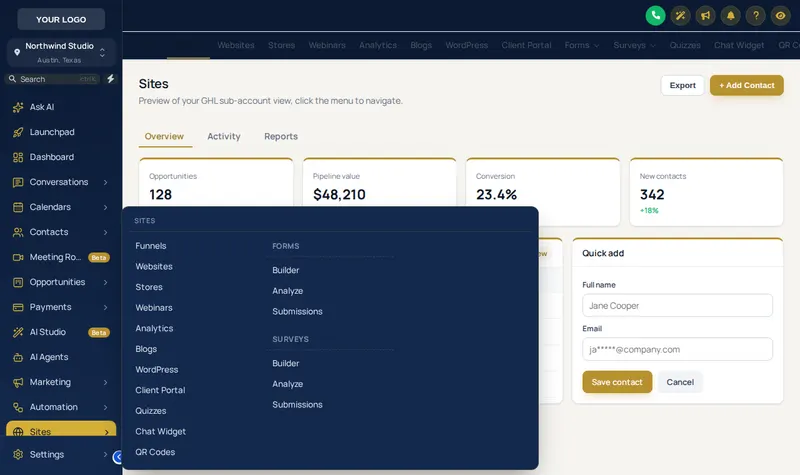
Because a menu that names things the way the firm works cuts training time and wrong clicks. "Opportunities" becomes "Matters", "Conversations" becomes "Intake inbox", marketing tools leave the paralegal's view, and every sub-page is one hover away.
Combined with the law firm GHL workflows in the snapshot, a renamed menu makes the system read like your intake manual rather than a generic CRM.
Shortcuts that follow staff to every page. Try the bubble and grid, dock bar, side rail layouts and 8 designs; drag it by its grip.
Drag items into order, use your own names and icons, group them under headings and hide what a role does not need.
Left sidebar, right dock, top bar or a top bar merged into the header, which saves a whole row of screen space on laptops.
Columns, Split, Cascade, Tiles, Tabs, Icon rail, Accordion, Wide. Every sub-page visible at a glance.
Solid, Floating, Glass, Brand gradient, Underline, Segmented, Centered, Slim.
From GoHighLevel's default to soft tint, brand, gradient, glass and an accent line.
Agency staff and each sub-account get their own item list and layout settings.
One-time payment, lifetime access·Login emailed within minutes (max 24 hours)
Yes. Rename, reorder, hide and group every item, give items your own icons, add your own links, and choose where the menu lives: left sidebar, right sidebar, a top bar or a top bar merged into the header.
Yes. Each view has its own list of items and its own settings, so agency staff and a firm's intake team each see what suits them.
Sections with sub-pages, such as Payments or Sites, can open all their sub-pages at once in a mega menu instead of a plain list. There are 8 styles, from columns and tiles to tabs, an icon rail and a full-width band.
A small menu that floats over every page with the shortcuts you choose, in 3 layouts (bubble with grid, dock bar, side rail) and 8 designs. Staff can drag it wherever it suits them.
Hiding removes it from the menu, not from GoHighLevel. To restrict access, combine it with GoHighLevel's own user permissions.
The customizer learns each section's tabs and drop-downs from GoHighLevel as people use the app, so new GoHighLevel pages appear without you doing anything.
Items GoHighLevel adds are appended automatically unless you turn that off, and clicks go to GoHighLevel's own links, so navigation keeps working.
Retainer includes the choice of sidebar or top-bar layout. The full menu builder, mega menus and the floating quick menu start with Counsel ($697, one-time).
Counsel adds the menu builder, mega menus, the floating quick menu, dashboards, pipelines and contact actions. $697, one-time.
One-time payment, lifetime access. Login emailed within minutes (max 24 hours).
GoHighLevel and HighLevel are trademarks of HighLevel Inc. Lawyer Snapshot is independent and is not affiliated with, endorsed by or sponsored by HighLevel. The GHL Customizer is a third-party tool that restyles the interface; it does not change your data, workflows or automations, and nothing on this page is legal advice. Packages start at $297, one-time.
Manage how we use cookies. Necessary cookies keep the site working and can't be turned off.
Saved on this device. Press Esc to close.