The GoHighLevel contact actions bar: intake in one click
Conflict cleared. Consult booked. Retainer sent. Your team sets the same tags and fields on nearly every new contact. Put them on a bar at the bottom of every contact record, each one a single press that can start a workflow.
What do GHL quick tags do?
GHL quick tags are one-click chips on a contact record that add or remove a tag. Because GoHighLevel workflows can start when a tag is added or removed, a quick tag turns a routine intake step, such as marking a conflict check cleared, into the trigger for the next automation.
That pairs neatly with the snapshot's law firm GHL workflows: the bar is the switch, the workflow is the machinery.
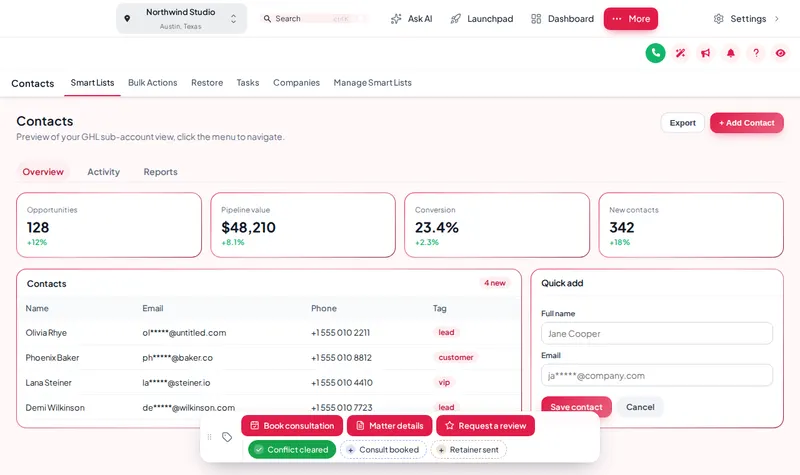
Use the real contact actions bar
Set up with intake tags and a Matter details form. Tap a chip, open the form, drag the bar by its grip, and change chips, position and theme.
Loading the live preview…
A color per tag: this is the real contact actions bar. Tap a quick tag to add or remove it, open Matter details to see its form, or drag the bar by its grip. In the preview nothing is saved.
Building an intake bar in four steps
You design the bar in your own customizer account. Nothing here needs a developer or access to your GoHighLevel login.
Teams that work the bar all day usually want a cleaner workspace too; see the sidebar menu builder.
- Audit
List the repeat clicks
Note the tags and fields intake staff set on nearly every contact: conflict cleared, consult booked, retainer sent, practice area.
- Build
Make chips and buttons
Turn each into a quick tag chip or a button, with your own label, icon and color.
- Form
Add a mini form
Group the custom fields that are always filled together into one small form behind a button.
- Place
Place and save
Choose one of 6 positions, decide which sub-accounts see it, and save. It appears on the next page load.
Intake shortcuts firms set up first
Conflict check result
A green chip when a conflict check clears, which can release the consultation booking workflow.
Retainer sent and signed
Two chips that start and stop the reminder sequence for an unsigned engagement letter.
Matter details form
Practice area, incident date and referral source filled in one place instead of three tabs.
Review request at closing
One button when a matter closes well, feeding the review automation.
Contact actions start with Counsel
One-time payment, lifetime access·Login emailed within minutes (max 24 hours)
Contact actions questions
What is the GoHighLevel contact actions bar?
A small bar that sits on every contact record with one-click tag chips, buttons and mini forms. It can sit in 6 positions, be dragged anywhere, and update the contact without opening menus.
How does it change the contact?
Through GoHighLevel's own API, with the signed-in user's session, making the same calls GoHighLevel's interface makes. A user can only do what their GoHighLevel permissions already allow.
Can a button start an intake workflow?
Yes. Buttons add, remove or toggle tags, so any workflow with a "tag added" or "tag removed" trigger, such as sending a retainer agreement or booking a consultation reminder, starts from one press.
Which custom fields can a mini form fill in?
Any custom field in the sub-account, found by name, key or id. Each form field links to one, with types such as text, paragraph, number, date, drop-down, email, phone or link, and can be required. Practice area, incident date and referral source are common choices.
Does it leave an audit trail?
If you want one. A note can be added to the contact recording which tag was added or removed and by whom, and which field changed from what to what, useful when several staff touch one matter.
Can different firms see different buttons?
Yes. Each chip and button can be limited to a list of sub-accounts or shown in all of them, so an agency can give a PI firm and an estate planning firm different shortcuts.
Is anything saved when I use the preview here?
No. The preview runs the real bar on a sample page, but nothing is sent anywhere. Inside GoHighLevel the same presses update the contact.
Which package includes contact actions?
Counsel ($697, one-time) and above.
Related exhibits
Turn intake steps into single clicks
Counsel adds the contact actions bar, menus, dashboards and pipelines to every theme and login design. $697, one-time.
One-time payment, lifetime access. Login emailed within minutes (max 24 hours).
GoHighLevel and HighLevel are trademarks of HighLevel Inc. Lawyer Snapshot is independent and is not affiliated with, endorsed by or sponsored by HighLevel. The GHL Customizer is a third-party tool that restyles the interface; it does not change your data, workflows or automations, and nothing on this page is legal advice. Packages start at $297, one-time.