Onboarding a new client
The welcome email links to a sign-in page that matches the engagement letter, so the first login confirms the client is in the right place.
The login screen is the first thing a new client sees after signing an engagement letter. Replace the stock page with one of 16 animated designs in your firm's colors, with matching two-factor and password reset screens.
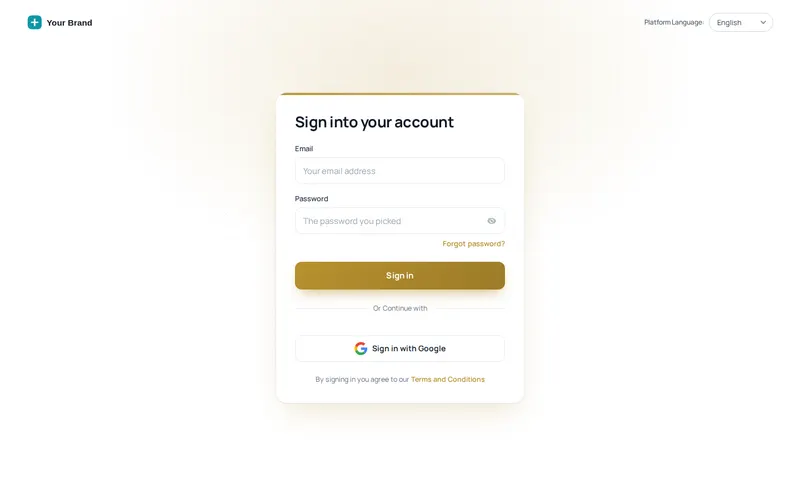
A custom GoHighLevel login page is a restyled version of the sign-in screen at your white-label domain. The customizer delivers it as one CSS line, so the page carries your logo, colors and an animated background while GoHighLevel still handles the sign-in itself.
Because it is CSS, nothing about authentication changes. The design simply wraps GoHighLevel's own form, which is why it also covers the two-factor code and the password reset screens.
Opens on Minimal glow. Try a firm color with the Brand chips, then switch to the two-factor and reset screens.
Loading the live preview…
Minimal glow: the same CSS that ships to GoHighLevel, applied to a copy of the real login markup. Switch screens to see two-factor and password reset.
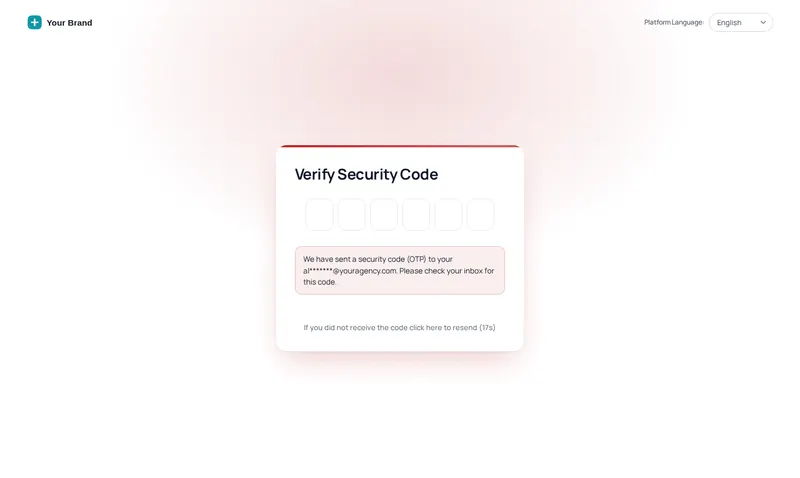
Many firms switch on two-factor sign-in for client portals. If only the first screen is branded, clients land on a stock page at the exact moment they are typing a security code, which is when they are most alert to anything that looks unfamiliar.
Every customizer login design restyles that screen and the password reset page too, so the whole sign-in journey reads as one firm.
The welcome email links to a sign-in page that matches the engagement letter, so the first login confirms the client is in the right place.
Co-counsel and referral partners who log in to shared pipelines see your brand, not a generic CRM.
Agencies give each firm a distinct front door per workspace, a natural partner to the snapshot reseller license.
One-time payment, lifetime access·Login emailed within minutes (max 24 hours)
How the login design is delivered, what it covers and what it leaves alone.
Yes. The customizer ships 16 animated login page designs for GoHighLevel. You choose one in the editor, set your logo and colors, and paste a single CSS line into GoHighLevel once.
GoHighLevel does not run Custom JS before someone signs in, but it does load Custom CSS. So login designs are delivered as one CSS import in Agency Settings, Company, White Label, Custom CSS, next to the script line for the rest of the app.
Yes. Every design styles the sign-in screen, the security code screen and the password reset screen, so a client never drops back to the stock look halfway through signing in.
Minimal glow, Editorial and Split hero read as calm and professional; Frosted photo and Cinematic work if you have strong office or skyline photography. Use the Brand chips in the preview to see a design in a firm crimson, navy or brass.
Yes. Designs with a photo let you swap the image, and designs with quotes let you write your own lines, one per line with the attribution after a dash. Keep client confidentiality in mind and avoid anything that identifies a client.
Yes. Every design is responsive. Use the phone button in the preview window to see how a design adapts to a narrow screen.
Each workspace has its own login CSS address, so separate brands can carry separate designs. Retainer includes 1 workspace, Counsel includes 2 workspaces, Senior Partner includes 3 workspaces.
No. It only changes how the screens look. Sign-in, two-factor and password reset still run through GoHighLevel exactly as before.
All three. Retainer ($297, one-time) includes all 16 designs.
All 16 login designs come with every package. Retainer is $297, one-time.
One-time payment, lifetime access. Login emailed within minutes (max 24 hours).
GoHighLevel and HighLevel are trademarks of HighLevel Inc. Lawyer Snapshot is independent and is not affiliated with, endorsed by or sponsored by HighLevel. The GHL Customizer is a third-party tool that restyles the interface; it does not change your data, workflows or automations, and nothing on this page is legal advice. Packages start at $297, one-time.
Manage how we use cookies. Necessary cookies keep the site working and can't be turned off.
Saved on this device. Press Esc to close.