Imagine being a busy solo attorney with a calendar packed full of court dates, client calls, and consultations. Now imagine finding out that over 100 potential clients tried to reach you—but got lost in your inbox, missed call log, or unmonitored Facebook DMs.
That’s exactly what happened to one small law firm—until they implemented a Snapshot inside GoHighLevel. Within just 30 days, they recovered more than 100 missed leads, booked dozens of consultations, and dramatically increased revenue—all without hiring more staff.
This case study walks you through the exact strategy, tools, and pricing that made this turnaround possible.
📌 Key Takeaways
⚠️ Manual processes led to 100+ missed leads in 90 days
🚀 A single GoHighLevel Snapshot solved the lead follow-up issue
🤖 Automation + AI handled messages across SMS, web chat, and email
🗓️ 38 appointments were booked automatically in 30 days
💰 The lawyer converted 45+ clients with zero new hires
🔎 The Problem
Missed Leads, Missed Opportunities
Before automation, this attorney’s firm was functioning on:
✉️ Manual email replies
☎️ Missed-call callbacks (when time allowed)
🧍 No dedicated intake coordinator
📆 Leads waiting 1–2 days to hear back
In short: no automation, no workflows, and no system in place to follow up on leads from website forms, Facebook ads, Google search, or referral pages.
This created a lead bottleneck, especially after business hours and weekends, when no one was available to reply. Most leads went cold or chose a faster competitor.
🔧 The Solution
Implementing a Snapshot Built for Law Firms
The turning point came when the lawyer connected with a HighLevel-certified agency offering a done-for-you legal Snapshot.
This Snapshot included:
✅ Pre-built workflows for lead follow-up
✅ A “missed call text back” system
✅ Website chat widget integrated with SMS & CRM
✅ Email nurture sequences with built-in legal disclaimers
✅ Automated reminders + AI chat responses
It was customized for the firm’s practice area (personal injury), imported in one click, and fully configured in less than 48 hours.
🎯 Your Leads Deserve Better. So Does Your Law Firm.
This lawyer recovered 100+ leads in 30 days—with no new hires. Imagine what’s possible for your firm. Launch Your Snapshot Today and never miss another lead again.
🧠 Why Snapshots Work for Law Firms
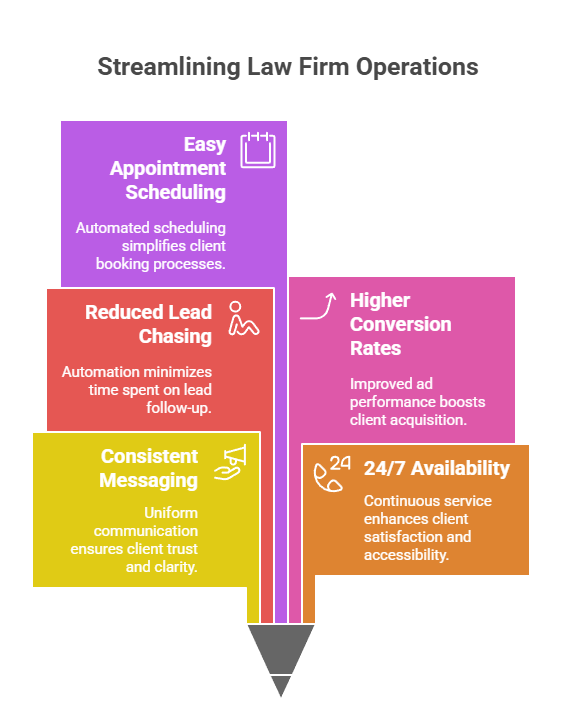
A GoHighLevel Snapshot is more than just a template—it’s a business in a box. For law firms, that means:
Consistent messaging to every lead
24/7 availability (even when you’re in court)
Less time spent chasing leads
Higher conversion rates from paid ads
Easy appointment scheduling via automation
“The Snapshot made us feel like we had a full-time intake team... without the payroll headaches.” – Law firm owner
⚙️ Automations That Made the Magic Happen
Here’s what the agency enabled inside the lawyer’s GoHighLevel account:
📥 Form Submission Follow-Up
As soon as someone filled out a form, the system triggered:
✅ SMS: “Thanks for contacting [Firm Name]! What happened?”
✅ Email: Detailed response with next steps
✅ Internal notification for follow-up (if needed)
📞 Missed Call Text Back
If a potential client called but didn’t reach someone live:
📲 “Sorry we missed your call! Can you briefly share what happened so we can help?”
This one automation alone re-engaged 67 leads in 2 weeks.
💬 AI Web Chat
The law firm’s website had a chat widget, but it wasn’t being used. With Conversation AI enabled:
🤖 Auto-replied to FAQs
📆 Booked consultations
📈 Captured contact info for follow-up
💡 Tip: AI was set to “Suggestive” mode first, then switched to “Auto-Pilot” after testing.
📤 Cold Lead Reactivation
Using workflows, they triggered a 3-day SMS and email campaign for leads who didn’t book immediately. This alone brought back 18 lost leads in 7 days.
📊 Real Results in 30 Days
| Metric | Before Snapshot | After Snapshot (30 Days) |
|---|---|---|
| Avg. Response Time | 24–48 hours | Under 1 minute |
| Missed Leads (90 Days) | 100+ | 0 |
| Appointments Booked | ~5/month | 38 |
| New Paying Clients | ~2/month | 45 |
| Client Acquisition Cost | $200–$300 | $70 |
| AI + Workflow Engagements | 200+ contacts | 95% open rate |
🔁 What Made This Work
🧩 Done-for-You Setup
The agency used GoHighLevel’s Snapshot Import Tool to load everything in one click. The only customization needed was:
Logo + firm name
Niche-specific tweaks (e.g., “personal injury” → “slip and fall”)
Calendar connection
Email + SMS domain configuration
No tech skills required. Everything was already tested and ready to go.
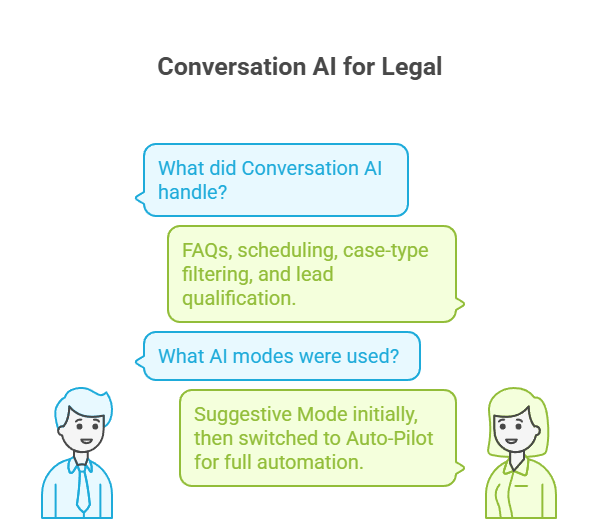
🧠 Conversation AI for Legal
GoHighLevel’s Conversation AI played a huge role by responding to leads around the clock. It handled:
FAQs
Scheduling
Case-type filtering
Lead qualification
🧠 AI Modes Used:
Suggestive Mode (team could edit replies)
Switched to Auto-Pilot for full automation after testing
📲 Integrated Communication Channels
All communications—SMS, email, web chat, Facebook DMs—were routed into one central conversation dashboard. That made it easy to:
Track every lead
Ensure no one fell through the cracks
Assign contacts to specific pipelines
🔒 Legal-Safe Messaging
The Snapshot included legal-specific workflows with disclaimers, including:
“This message does not establish an attorney-client relationship.”
Opt-in confirmation for SMS
Review requests with proper language
This ensured compliance and professionalism from day one.
💼 Replicating This for Your Firm (or Your Clients)
Want to recreate this success? Here’s how:
Choose a Legal Snapshot Template
Find a legal-focused Snapshot from a HighLevel partner or agency.Customize the Content
Update branding, practice area, email tone, and call-to-actions.Connect Your Calendar
Sync a calendar for automated appointment booking.Enable Conversation AI
Start with “Suggestive Mode” and move to “Auto-Pilot” after training it.Test and Launch
Run tests using internal contacts, then go live with form triggers and missed-call automations.
🧩 Pro Tip: Use Workflows + Associated Records to track every client intake from start to signed retainer.
❓ Frequently Asked Questions
What is a Snapshot in GoHighLevel?
Does this only work for personal injury law firms?
Do I need coding skills?
What’s the difference between Suggestive and Auto-Pilot AI?
-
Suggestive Mode: AI provides responses, but you review them before sending
-
Auto-Pilot: AI responds automatically across all selected channels
Can I resell this as an agency?
Conclusion
This isn’t just a story about software—it’s a story about solving a real problem with automation, intelligence, and strategy.
One lawyer, drowning in missed calls and manual follow-ups, turned it all around with one smart move: implementing a Snapshot.
No new hires. No complicated tech. Just the right tools, set up correctly, doing the heavy lifting.
If you’re a legal professional or an agency that serves them, there’s never been a better time to bring automation into your intake process.